btrfld
-
Posts
591 -
Joined
-
Last visited
Everything posted by btrfld
-
Curious indeed. The thing I notice is that it doesn't seem so much to go to a specific place in the page, but rather to a percentage of the way down. If I change the size of my browser window and reload, the page goes to a slightly different place each time, depending upon the window size. And, by the way, it's fine in Opera7 as it is in IE6. Don't know if that helps any, but it's something. More research, I guess.
-
Hi Tracy. Here's one I came across that's pure php - no javascrpt involved I think. Put it in the directory with your images and call it. Modification possible but not necessary: http://www.zinkwazi.com/pages.php?page_name=scripts Then, here's the code of one that uses php to build a javascript array of the files in the directory. I don't even remember where I got this one. Again, you can just put it in the directory with the images and call it. I modified it myself so it has forward and back 'buttons' and a pause/play button. I have used the second one several times. The first one I've tried out for testing, but never used on a site (so far). A place to start anyway. Hope it helps. Jim
-
Hi Thomas. The new form of the break <br /> is the XHTML form. Part of the XHTML specification is that all tags must be 'closed', even ones like <br> and <img> that have no 'interior' component. I'm not sure, but I think that placing the space before it keeps HTML 4.x from choking on it. As for whether you can remove it: it depends upon the DOCTYPE declared at the top of the file. If you're declaring this as an XHTML document and you remove the /, the document won't validate. It will still probably work, but the results may be unpredictable, depending upon what browser is interpreting it. http://www.w3schools.com/xhtml/default.asp is a place to start learning about the differences. Hope this helps. Jim
-
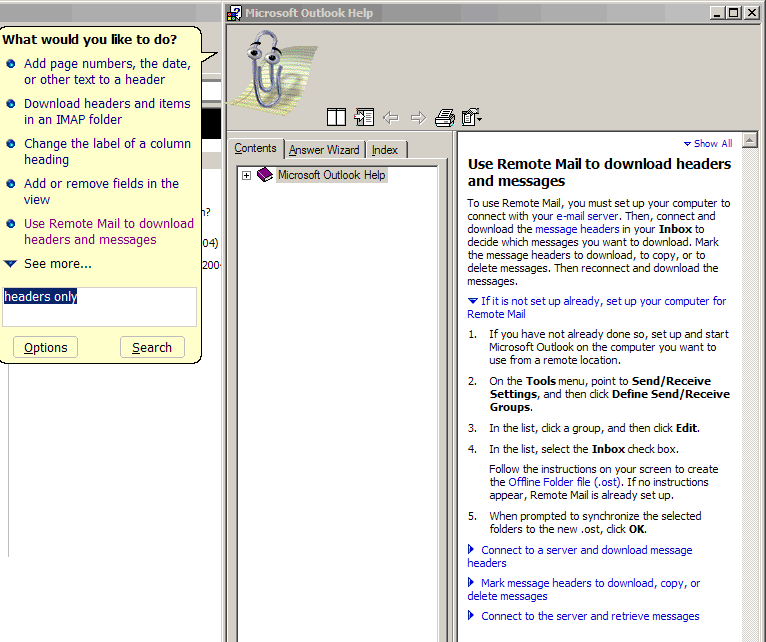
I did a query in Outlook Help and I came up with instructions for setting up something called Remote Mail. I've never used it, but at least the description seems to be what you're looking for. I'm attaching a screenshot of the Help window. Hope it helps. Jim

-
That's it exactly, Thomas.
-
Hi Tracy. In my (limited) experience, royalty free means you can indeed use them as you will in your application. If there's a requirement about giving credit or something it should be clearly stated on the cd you got. As far as altering images, I don't know. Seems to me if you start with a royalty free image with no express restrictions, and then alter it, you've essentially made a new thing, and it's yours. But I'm certainly no expert, so maybe someone with more experience will chime in.
-
Work of a sort, but for my passion. I'm an actor, and I just finished my first of Shakespeare's major characters. Heady stuff, and I'm glad to be back to a slightly slower schedule. Thanks for asking.
-
You're welcome, Kasey. I've been very busy lately, and so haven't been able to spend much time at the forum. What fun to come back and find a question from you; one not only that I could actually answer, but that no one had already picked up for you. I see that Rick has you set up. Very cool. As ever, Rock Sign Jim
-
You might check out Plans Calendar on the TCH Help Web Site.
-
Hi Kasey. Happy Memorial Day to you. You can easily find out what's installed in php by using a built-in phpinfo function. Create a new file, called info.php or something. In it put only the following: <?php phpinfo(); ?> Upload it and navigate to it, and it will give you all the information there is about what's installed and activated on the machine it runs on. Have fun Jim
-
You can pretty simply create a database and have the 'action' of the form call a php script that puts the info into the database. If you're new to programming and/or databases with php, I reccommend Kevin Yank's excellent article. Please keep asking if that doesn't do it for you. Jim
-
Homepage Acting Crazy - One Link Not Working
btrfld replied to kendra's topic in Dreamweaver & Flash
Hi Kendra. Here's a link to a page with some very useful info about protecting email links. Hope it helps Jim -
Excellent. Thanks both for your comments.
-
My SpyBot v1.2 doesn't seem to think there is an update available. When I run the 'Check for Updates' routine, it tells me there is no newer version available. ?????????
-
Hi Tracy. I believe that new accounts are set up so that all undirected mail goes to the main email box. That's probably why it's filling up. Have you set up an MX record to direct mail for the account to the old mail server? It's in WHM, toward the bottom of the left-side menu. I think that's how you keep mail going there instead of accumulating on the server here. Some guru please set Tracy straight if I'm wrong.
-
You can put it outside the public_html directory structure, in a folder called, say, 'safe'. Then you have to reference it by That way it can't be accessed by FTP.
-
Hi Kasey. Once again you've caught me when I have to go out for a few hours. But you might take a look at this article from A List Apart. I look forward to seeing how you've progressed when I get back. Have fun Jim
-
My pleasure. I'm glad it worked. Of course feel free to keep asking. As the Gurus say, we love to help!
-
Hi Tracy. Maybe the Box Model Hack can help here. It's a way to show IE what it wants to see, and then show the rest of the browsers something else. Just substitute the things you want to control for the Box stuff. Hope it helps a bit. Jim
-
I'm glad it worked somewhat. If you're using the ID for CSS styling/positioning, try making it a CLASS instead of an ID. You can have as many things as you want with the same class.
-
I have the same results, with the addition that Opera7 seems to behave like IE6. Perhaps they're reacting to the fact that you've given all the result <div>s the same ID when you're actually supposed to have only one thing in a page with the same ID. You might try adding an incrementing number to the ID and see if it changes: Hope it helps Jim
-
Yes, it can be done. You do it by setting up a forwarder for each email you want the messages to go to. I don't know if there is a limit; one of the Gurus will have to answer that.
-
Couldn't happen to a better person. All the best, Mike.
-
Hi Kasey. You certainly do come up with tasty issues. So far I can tell you that the content <div> is not the problem. It actually appears in exactly the same place in Firefox, Opera7 and IE6. Guess the issues must be on the links <div>. I have to go out for an hour, but I'll get back at it later tonight. Thanks for the challenge! Jim
-
Awstats And Sharing Info With Client
btrfld replied to wigoweb's topic in CPanel and Site Maintenance
No relation that I know of. He's a computer heavy-hitter, I think; one of the gurus of the old Commodore64. I, on the other hand, am an actor, so I wouldn't mind having some of his notoriety. I'm glad the link was helpful.