KevinW
-
Posts
1,024 -
Joined
-
Last visited
Everything posted by KevinW
-
For your web browsing pleasure ... FuzzyMonkey CGI/PERL Scripts -kw
-
Wow, Lianna - yu'r fast!!!
-
Someone correct me if I'm wrong ... but it's not required that you use the TCH server for outgoing email. Yoiu can just as easily configure your email client to use your ISP's server for outgoing email. --kw
-
Changing "from" Field In Form Emails
KevinW replied to cherryo's topic in CPanel and Site Maintenance
you're welcome! :-) kw -
If you download the ZIP version of the survey file to your PC, and then unzip the file (using WinZIP or PKZIP) to a new folder, you will find included a README file which includes the detailed steps required to instal it on your web site. I've listed the summary of the steps required further on down. On the other hand, you may wish to consider a much easier road, by using a free 3rd party web company, such as Bravenet to imlement your poll. They do all the work for you. All you need to do is include a small snippet of HTML code that they will provde you. BTW, here is a summary of the steps required to install the survey program you were looking at: SUMMARY ------------------------------------------------ This script allows you to conduct a survey over the web and stores the responses in a MySQL database. You can retrieve the results over the web in either a pretty HTML table, bargraph summary, or download to a spreadsheet. 1. make the HTML form for the survey 2. edit a few lines of the CGI script to accomadate your questions 3. create an empty MySQL database to hold the answers -kw
-
Keep in mind a couple of things about the time setting for checking POP3 email: 1. You need to provide enough time to allow an email with a long attachment to finish downloading. If you have your POP3 checking every 60 seconds, but an attachment will take 3 mintes to download ... you may enter the world of email thrashing ... the client side keeps asking if there's new email, but the server side can't finish sending the old email from the last request 2. Interesting to note that on Microsoft's Exchange 2000 Servers, the minimum time that you can configure their POP3 connector to check for new email is 15 minutes! Yep, minutes, not seconds. 3. Personally, I have several Exchange 2000 servers installed, and not one customer of mine have ever noticed that email only arrives every 15 minutes. And you know what, unless I were to make a big deal of it ... they will never know! 4. So, If you have users trying to configure their email clients in seconds, I would urge rethinking this situation. Most personal installs of Outlook Express or Outlook or Eudora that I do, I usually set the POP3 connector to 5 minute intervals ... which seem to be more than adequate. Just my $.02 worth! -kw
-
First -- an FTP utility (whether FTP Commander or CuteFTP or Smart FTP), is onll a program. Uninstalling or installing any such program does NOTHING to your files on your web. You can have multiple FTP programs. I have both WsFTP and CuteFTP installed on my computer at home. CuteFTPhas a free 30 day trial. SmartFTP is free. As to CHMOD ... CHMOD is essentially a short hand numbering system for assigning permissions. Example: chmod 755 The '7' says that the user (owner) of the file can read, write and execute the fie The middle '5' says that users in the group can read & execute, but not write (modify) the file The last '5' says that the world (others) can also read & execute, but not write (modify) the file As you can see, what we are doing is assigning different permissions to different groups of users! Where do these numbers come from: Permission to 'read' a file is assigned the value of 4 Permission to 'write' (modify) a file is assigned a value of 2 Permission to execute (run) a file is assigned a value of 1 All you do is determine the permission required, and add up the values. If we want to assign permission to read, write and execute, that would be 4+2+1 = 7 If we want to read and execute only, that would be 4+1 = 5 If we only wanted someone to read a file, that would be 4 If we only wanted to read or write but not execute, that would be 4+2 = 6 So if your instructions were to say CHMOD 644 -- can you figure out what permissions we are setting?? You have to work backwards. 6 = 4+2 ... 4=Read, 2=Write ... so we are saying that the owner (user) of the file can read & write (modify) the file inq uestion the middle '4' (remember Read=4) says that other users in the group are allowed to only read the file the last '4' says that anyone else in the world can only read the file Hope this helps kw
-
LOL = Laughing Out Loud -kw
-
is this php script designed for being run from a command prompt or from a web page? By default, you do not have access to a shell environment (command line prompt) with TCH. As far as running browser aware php scripts, simply upload it to your public_html directory, then run it from a browser. So, if it is script.php and it is sitting in your public_html directory, you would enter http://www.yoursite.com/script.php As a test, to prove to you that it works, go to the TCH Help Web Site, click on Tools and Scripts, and then download the zipped version of phpinfo.php. Unzip it (one file), and then FTP upload phpinfo.php to your public_html directory. You should then be able to run it from a browser, as: http://www.yoursite.com/phpinfo.php Hope this helps! kw
-
Changing "from" Field In Form Emails
KevinW replied to cherryo's topic in CPanel and Site Maintenance
what did you use to create your forms? usually there is a place in the script for entering the email address that the form will be sent to. With TCH, you could easily setup a dummy email address, such as info@mysite.com and then have all email sent to info@mysite.com be forwardded to your real email address cherry@mysite.com -kw -
I don't use FTP COmmander, so I cannot tell you how to do it with their software. In general, though, most FTP client programs work the same way: once you get a list of your web site files and directories to appear in your FTP software, as you were told, you simply right click on the file, and a popup menu usually appears, and CHMOD is one of the options. At least, it works that way for CuteFTP and WsFTP. But, not to worry, you have an alternative! You can do CHMOD instruction's via cPanel's File Manager. 1. Open up cPanel on your web site 2, click on File Manager (may be located under the Access Menu section of cPanel) 3. click on the folder icon next to public_html 4. locate the file or directory you wish to change permissions and click on the name of the file 5. on the right side of the screen you will find a list of options, including Change Permissions! Hope this helps! kw
-
Chuck, if it's OK, I have extracted your comments from above and added them to the TCH Help Web Site, for future reference! Click on 3rd Party > Dreamweaver -kw
-
rayners, please clarify process of using tar.gz and I'll add it to the TCH Help web site. That is: 1. if you upload the tar.gz file to the web site, do you simply place it in public_html/ or within a created subdirectory (like public_html/mt)? 2. when you use file manager to unpack it, will it ask where to store it? Thanks -kw
-
We've recently added two new DNS / Domain name lookup utilites at the new TCH Help Web site! Method #1 gives you one one screen the ability to ping, traceroute or nslookup. Additionally, the nslookup allows you to check against a specific nameserver. Method #2 provides detail information in one simple screen. Both are provide as tools for you! -kw
-
When I enter the URL as I posted, I get the attached screen. If you are not, then you have something on your compuyter or network interfering - possibly a firewall? -kw

-
Procmail/spamassassin Weirdness
KevinW replied to gabeanderson's topic in CPanel and Site Maintenance
I don't use procmail myself -- just so you know we're not ignoring you on purpose! :-) kw -
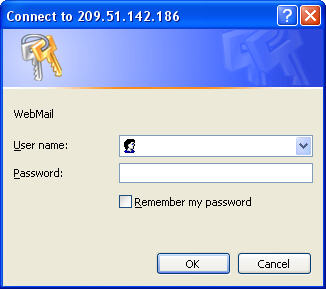
The instructions did not instruct you to enter a port number ( :2082) It said to enter something like: www.yoursite.com/webmail In your case, then, you should enter: http://209.51.142.186/webmail HTH -kw
-
For starters, check out Macromedia's Dreamweaver support page on Setting up an FTP connection -kw
-
Your web site's home page loaded in just about 3-4 seconds, and I am on a DSL line at home. But saying that, take a look at the following numbers: Your blue flower gif image is 38kb in size Each of your 8 graphical buttons are approx 6kb in size, for a total of 48kb But, you also have a 2nd version (when you hover over each image), for another 48kb Then your page counter image is 4kb in size And youyr background image is another 3kb in size And your HTML page itself is 7kb in size That's a grand total of 148kb of data that must be downloaded to a visitor's computer/browser. Let's call it an even 150kb If a visitor is on a dialup 56kbps line (let's call it 5k bytes), that means 30 seconds for your home page to completely download and display. Even on my DSL line, if I was acheiving a maximum 768kbps (let's call it 70k bytes) would mean a full 2+ seconds to display! Bottom line -- you should look at optimizing you graphics. -kw
-
Perhaps the first question is: what problem(s) do they want to solve by making their database available via the web? Most secured databases are never put on a public web site; rather they sit on a separate server behind a firewall. The Internet web site would use custom code to display the forms to users on their web browsers, and to then send requests to this database sever (for queries, updates, etc.). In other words, if the publish web site is violated, there is no data there to steal. Whether you wish to use Access/SQL or MySQL/Php, you have similar security issues to address. -kw
-
OK, it's been added. Take a look at Let users change their email password -kw
-
Good question. Good answer. I'll have to add that to the TCH Help site tonight! -kw
-
There are plenty of web sites that allow you to do DNS lookups (nslookup) of a domain name. Found a site tonite that allows you to specifiy the DNS name server to use for the query. Take a look at NSLOOKUP. Why do you need something like this? Case in point: I am in the process of transferring an existing web site over to TCH. I went to Network Solutions. where the domain name was registered, and upgraded the domain name so that its nameservers pointed to TCH. So far so good. Well, a week later -- everyone in the world, just about, can see the new website -- except for me at home! From home, entering the web site's domain name takes me immediately to the old site, not the new site. I knew my computers and server and network connections were OK. I am connected to the Internet via DSL from Verizon. So, using the above NSLOOKUP web site, I was able to test the domain name against each of the 4 valid Verizon DNS name servers that my router picks up automatically. And guess what? Two of the 4 Verizon name servers have outdated information and were showing my site's domain name with the old web site's name server. I used this information to contact and inform Verizon that their DNS name servers are not current with each other! -kw
-
No answer tonight, but I'll get back to you on it tomorrow or the next day! -kw
-
Well, you have a lot of work ahead of yoy to decide what you want to do and how you wish to do it. How do you want people to pay you - credit card? check? paypal? all the above? How do you want to handle shipping, taxes, returns, damages, etc? How many items do you have - 5? 50? 500? 5000? How much of the coding and programming do you want to do yourself? Anyhow, a god place to start is with cPanel. When you signed up with TCH, you have access to cPanel, which gives you two free shopping cart alternatives - Interchange and Agora. Take a look at the Agora's Web Site and look at their demo shopping cart. Then come back with your other questions! -kw