leezard
-
Posts
550 -
Joined
-
Last visited
Everything posted by leezard
-
conga rats Andy!!!
-
If you only want to have one e-mail address z@**** first create that account, then go to the default address section of control panel. Click on set default address and you'll get a screen like I attched below. If you dont have any subomains set up the only chioce you will have in the first box is your domain name. In the next box type in :fail: and then click change. This will make any e-mail not sent to z@**** to bounce back to the sender, if you decide to add e-mail accounts you wont have to change anything here because it only affects unrouted mail. Example z@**** is the only e-mail address you have created, I send an e-mail to x@**** and it will get bounced back to me.

-
if you want it in a subdomain like nuke.**** create the subdomain and then when you install nuke it will ask where to install it >http://www.****/________ in the blank put in your subdomain if you used the example above it would be nuke.
-
works great on win2K/IE 6 and isnt to much of a resource hog. I really like this desktop, i my have to start messing around with active desktop to see what i can come up with, i really like the toolbar just wish i could add more links to it
-
pinky
-
did you register a domain name when you signed up with TCH or was it a domain name you already have? If it was a name you already had you have to change your DNS records to point to TCH DNS servers. TCH DNS servers are: NS1.TOTALCHOICEHOSTING.COM NS2.TOTALCHOICEHOSTING.COM If it was a domain name you registered through TCH you shouldnt have to do anything to the DNS record (I think) In your welcome e-mail there should be a username and password for accessing your cpanel, ftp etc. and also an address to access them either by domain name or ip address.
-
ice ice baby!
-
This is a pretty simple game. Just say something about the person that posted before you (keep it nice ) Theres a lot of info in peoples profiles sometimes so thats a good place to learn about people. Or it oould be something they have said in another forum Example, whoever posts next could say the person above me lives in Texas. (I live in texas)
-
vanilla
-
no problem, glad i finally answered the right question Kick Me
-
Red
-
My bad, let me try again I have mike@x-trememodz.com as my default e-mail so that I'll get any unrouted mail sent to that address, it should set up just like a normal e-mail address. if you want it to be catchall@****** just create an e-mail account with that name, set it as your default e-mail address and then set it up in mozilla mail . There arent any special settings as far as setting it up in your e-mail client since it is specified on the server side where all your unrouted mail should go. Hopefully that helps, if not i'll be quiet now
-
Go to your Cpanel and under the mail heading is a default mail option, there you can specify any e-mail address you want to be your default address, All unrouted mail willl go to that address. Example, someone send an e-mail to stuff@****** but you dont have an e-mail account called stuff set up. That e-mail would go to whatever address you specified as your default mail. Is that what you are trying to do or am I way off the mark?
-
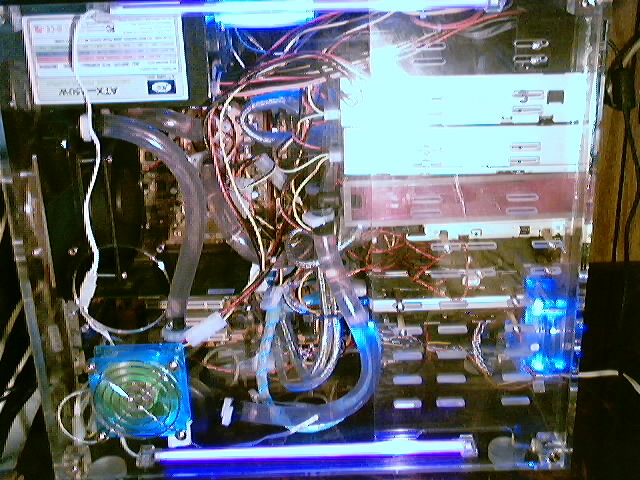
heres a webcam shot of the watercooling set up, I seriously need to rearange the wiring it looks like an octopus exploded in there. lower left corner behind the blue fan is a 195 gallon per hour hydor pump (used in aquariums) Just above the blue fan where that other fan hole is is the black Ice extreme radiator. Just to the right of the radiator Danger Den maze 4 AMD CPU waterblock (hard to see but its where the tube from the radiator comes out and runs to the cpu. From the CPU water goes to the resevoir, the pink box below the cdroms. From the resevoir it goes back to the pump to repeat the process. The tubing is 1/2" inner diameter heavy duty tubing (serious water flow) The reason the water is pink is because of the water wetter addative (kinda like antifreeze)
-
So, Dude...did you get a Dell??
-
I know subdomains dont need to propogate, since it was his forst post it was pretty safe to assume it was a new account.
-
did you put an index file in the subdomains you created? If there is no index page you will get a page can not be displayed message because there is nothing to display. Another thing it could be is DNS hasnt propogated yet. That usually takes 24-72 hours for your DNS to propogate through the internet.
-
only other idea i have is a bigger hard drive, more memory for your current laptop. I have my doubts about win2k running on that machine, and if it will it will be waaaayyyyyyyyyyyyy slow.
-
not yet, but i'm working on it!
-
Who says water and electronics dont mix?? I just installed a new water cooling setup on my main rig, nice and quiet!! Boy was it a pain in the butt to install tho!! I think it's time i move up to a full tower case, just not enough room in any of the midtowers i have. Kick Me
-
example the URL to this picture is >http://www.abbainc.biz/heidelcyl4-2.jpg It sounds to me like you have been using the page URL which is >http://www.abbainc.biz/heidelcyl4-2.htm
-
OK, i think i know what the problem is now....i think, you are putting the URL of the picture in as an html document right? go to the page that the picture is on, dont copy the address from the toolbar, right click on the picture and choose properties. That will show you the actual URL of the picture and thats what you want to put in as the image location.
-
I registered to try and post an auction, but you have it turned off, The only thing i can think of is maybe something is missconfigured in the auction script
-
OK, i think i understand a little more clearly now, the page you gave us a link for isnt the page that is having the problems, that is the webpage where the images are stored and you are trying to link to them. when you put the URL to the picture from the other site it isnt working on the site you are creating. Is that it?? Well i thouhgt maybe hotlinking was blocked but it obviously isnt. what is the URL of the page you are trying to get the pictures working on, not the URL of the page you are getting them from
-
I dont see any of the images NOT working, I've tried about 30 of them now and every one of them has worked fine.