webgyrl
-
Posts
894 -
Joined
-
Last visited
Everything posted by webgyrl
-
Andy, What I did was to try to unzip the files different ways with winzip and winrar.. but no luck. If there is a fixer I missed, please let me know what to do or where to look. I have not tried uploading them to the server actually. i was trying to unzip them here to get access to files locally on my own computer when i was dong a Joomla upgrade. Some of the files were modified and I wanted to grab the old files to compare them to the new Joomla files so that in case I overwrite a modified file I can go back to the old one and fix it all up. I will google Advanced Zip Repair for sure. Thanks!
-
Don, I will give this a try. What I think the problem is is this: I have lots of folders on my local drive. For all our web sites I have this set up Drive D Web Sites each site name has it's own folder I have in "sitefolder name" a BACKUPS folder in the backups folder I have a folder called "Complete Backups" so it's like this D:\\Web Sites\sitename\backups\complete backups I am thinking maybe when i go to extract it doesn't work well What's funny is that I grab backups of my Joomla sites from Joomla and I don't know why, but these ones unzip OK. I'll go get the info on Total Commander Thank You!
-
Hi gang, Just wondering if anyone knows a work around for this. I noticed lately when i try to unzip my cPanel backups that I run into corrupted archive warnings. I have a feeling this is because the filenames are so long. I *thought* I had backups of all our site files, but this turns out not to be true because i can't unzip them using either WinRAR or WinZip. I keep getting archive corrupt messages. Does anyone know how I can rescue my site backups? Thanks!
-
Hmmm, I looked at the source and I see it. It's strange. It seems to be the default color in all MySpace music profiles. I checked another site and it's there too. It seems that those border colors can be controlled with some CSS hack. I am just not sure how to do it. There must be something that is being told to be 'transparent' that I have to figure out. Very frustrating...
-
Yeah, it's ugly huh! LOL I don't see what you wrote in that block of code I posted. That is where it should be. There are some things that are auto defined by MySpace, but all I generally put in for the Custom CSS is defined in that block. I don't see the hex numbers in that block of code. Is there any way you could screenshot that view source section and show me where you foudn that. It's not making sense to me that it wouldn't be controlled by that CSS block I posted. Thank you so much for looking for a needle in a haystack!
-
I've been going over and over this code for a bit now and I can't seem to find where to control these differently colored double lines that surround the info boxes. You can see the CSS in action here: http://www.myspace.com/nataliebrown In the code, I see in several places: border-style: double; border-color: 5A5D63 That is for the grey dash you see under "About Natalie Brown". It also appears in the top image box (not shown in the screen shot). But for the life of me I can not find where the blue and yellow double borders CSS is located in this jumble of CSS code. Also, I know that this CSS looks wrong, but MySpace has a parsed down version of CSS and a lot of hacks have to be done to make it work. I got this code from another place where they give free profiles, but I wanted to tweak it for this specific profile. I really want to change those double borders to all be white or some other color. Any ideas where it is in this jumble?? Here is the CSS in its entirety: ><div class="ab"> <a href="http://www.natalie-brown.com" target="_blank"> ..<img src=" http://www.natfunkmusic.com/myspace/layout/bannerpmg1.jpg" width="956" height="447" border="0" usemap="Map"></a> <map name="Map"> <area shape="rect" coords="1,-11,978,27" href="http:// www.natalie-brown.com" target="_blank"> <area shape="rect" coords="2,27,1008,432" href=" http://www.natalie-brown.com" target="_blank" alt="Natalie Brown Official Site"> </map> </div> <Style type="text/css">body{background-image:url(http://www.natfunkmusic.com/myspace/layout/ bglogospmg.jpg); background-attachment:fixed background-repeat:no-repeat; background- position:bottom right; background-color:6D7A83; margin-top: 449px; scrollbar-face-color:906B66; scrollbar-highlight-color:6A636D; scrollbar-3dlight-color:000000; scrollbar-shadow-color:FFFFFF; scrollbar-darkshadow-color:000000; scrollbar-arrow-color:000000; scrollbar-track-color:000000; } div.ab {position: absolute;top: 0;left: 50%;margin-left: -490px;width: 980px;height: 420px;} body table {margin-top:0px;} .nametext {background-image: url(http://www.natfunkmusic.com/myspace/layout/ titlepmg.jpg); background-position: bottom center; background-repeat: no-repeat; overflow: hidden; height: 100px; width: 174px; font-size: 1px; text-align: left; color: none; padding: 0px 0px 3px 0px; display: block; margin: 14px 0px 8px 0px; border-width: 0px 0px 3px 0px; border-style: double; border-color: 5A5D63;} .mygen { Text Properties } table, tr, td, li, p, div { font-family:arial; color:C6CFD6; font-size:12px; } td.text td.text table table table td a img {} td.text td.text table table table td div img {} td.text td.text table table td img {} td.text td.text table table td div img {} * html td.text td.text table table td img {} * html td.text td.text table table td a img {} * html td.text td.text table table td div img {} body {font-size: 1px; line-height: 1px;background-color:000000; font-family: Verdana, Arial, sans-serif; background-repeat: repeat-y; background-position: top center; background-image: url(http://www.natfunkmusic.com/myspace/layout/bgpmg.jpg);} p {margin: 0px 0px 1em 0px; font-family: Verdana, sans-serif !important} a, a:link, a:visited {color:WHITE; text-decoration: none;} a:hover {color:5A5D63; text-decoration: none} img {border: none} br {line-height: 20px;} form {border-width:0px;background-color:none;} input {background-color:transparent !important} body>div {margin-left: 10px;} table, tr, td, table table, table table td {border-width:0px; background-color: transparent;} table table table td {background-color:transparent;margin:0px;padding: 0 26px 15px 26px;} table table table table {border-width:0px;background-color:transparent;padding:0px;margin: 0px; background-image: none;} table table table table td {padding:0px;margin:0px;} table table table {margin:0px; background-color:transparent; background-image: url(http://www.natfunkmusic.com/ myspace/layout/bglogospmg.jpg); width: 100% !important; border-width: 3px; border-style: double; border- color: 5A5D63;} body table {margin-top:0px;} body td table, body div table {margin-top: 0;} font {color:white;font-size:10px} a font:hover {color:WHITE} a.navbar:link, a.navbar:visited {color:white} a.navbar:hover {color:WHITE} table tr td table tr td font {display: inline;} table tr td table a.navbar {font- size: 10px;} .text {color:WHITE;font-size:11px} a.text:link, a.text:visited {color:WHITE} a.text:hover {color:WHITE} .contactTable { width:300px !important; height:150px !important; padding:0px ! important; background-image:url(http://www.natfunkmusic.com/myspace/layout/contactbl.jpg); background-attachment:scroll; background-position:center center; background-repeat:no-repeat; background-color:transparent;} .contactTable table, table.contactTable td { padding:0px !important; border:0px; background-color:transparent; background-image:none;} .contactTable a img {visibility:hidden; border:0px !important;} .contactTable a {display:block; height:28px; width: 115px;} .contactTable .text {font-size:1px !important;} .contactTable .text, .contactTable a, .contactTable img {filter:none !important;} .contactTable .whitetext12 {display:none;} table tr td table tr td table tr td div strong {display: block; width: 270px;} .whitetext12 {color:WHITE; font-size: 12px; margin: 0px 0px 4px 0px; padding: 0px 0px 3px 0px; text-align: center; display: block; font-family: Arblackial, Helvetica, Arial, sans-serif; font-weight: normal; border-width: 0px 0px 3px 0px; border- style: double; border-color: 5A5D63; width: 270px} .blacktext12 {color:5A5D63;font-size:18px; font- family: Arial, Helvetica, Arial, sans-serif; font-weight: normal; display: block; margin-top: 14px} .blacktext12:before {content: "OMFG! ";} .btext {color:WHITE; font-size: 12px; margin: 14px 0px 4px 0px; padding: 0px 0px 3px 0px; display: block; font-family: Arial, Helvetica, Arial, sans-serif; font-weight: normal; text-align: center; border-width: 0px 0px 3px 0px; border-style: double; border- color: 5A5D63} .orangetext15 {color:WHITE; font-size: 18px; margin: 14px 0px 4px 0px; padding: 0px 0px 3px 0px; text-align: center; display: block; font-family: Arial, Helvetica, Arial, sans-serif; font- weight: normal; border-width: 0px 0px 3px 0px; border-style: double; border-color: 5A5D63; width: 372px} .lightbluetext8 {color:white} .whitetext,.whitebtext {color:white; font-family: Georgia, Helvetica, Arial, sans-serif; font-size: 12px; font-weight: bold} .whitebtext:after {content: " billion";} a.whitelink:link {color:WHITE; display: block; text-align: center; border-width: 3px 0px 0px 0px; border-style: double; border-color: 5A5D63; padding-top: 3px;} a.whitelink:visited {color:white} a.whitelink:hover {color:white} u {text-decoration: none; font-size: 10px;} .whitetext12 {width: auto} .contactTable {width: auto !important;} .contactTable span.whitetext12 {left: 0;} .orangetext15 {width: auto;} table table table td {padding: 0;} table table table {padding: 0 14px 14px 14px; border- color: 5A5D63;} table table table {max-width: 423px;} .nametext {height: 35px; width: auto;} a .text { font-weight: bold; font-family: Arial, Helvetica, sans-serif; font-color: C6CFD6 } b ody, html {visibility:visible !important; display:block !important} </Style> <style type="text/css"> body, html {visibility:visible !important; display:block !important} </style> <style type="text/css"> table table table td {vertical-align:top ! important;} span.blacktext12 { visibility:visible !important; background-color:transparent; background-image:url("http://www.natfunkmusic.com/myspace/layout headerpmg.jpg"); background-repeat:no-repeat; background-position:center center; font-size:0px; letter-spacing:-0.5px; width:435px; height:75px; display:block !important; } span.blacktext12 img {display:none;} </style> Here is the image (click thumbnail for large view):
-
I've used Ultimate Form Mail in the past and that has been nice. http://www.ultimateformmail.com/ You should find a bunch of stuff at Hotscripts tho.
-
Yeah! Now if I could only figure out what is making thouse double lined borders different colors, I'd be set. That is proving to be very difficult! LOL
-
Ok! It's so funny how lately when I've posted a problem here after pouring over code, the solution suddenly dawns on me! DUH! LOL I found the culprit bit of code. >form {border-width:0px;background-color:none;} input {background-color:transparent !important} I changed it to >form {border-width:0px;background-color:000000;} input {background-color:CCCCCC !important} Worked like a charm! YAY
-
Hi All! I was wondering if some HTML/CSS god could have a look at the following code and tell me what in the world is messing up my "Submit" buttons on my MySpace page. I've done a custom design for it piecing together bits of codes to hack the MySpace layout. Everything looks pretty good except that for some reason my "Submit" Text and all my form text for my eNewsletter sign up is not showing up. It's there as when I drag highlight it I see the text in the box, but I can't see it normally. Just so you know, the page I am referring to is here: myspace.com/nataliebrown Here is the CSS code I used to create the layout: ><div class="ab"> <a href="http://www.natalie-brown.com" target="_blank"> ..<img src=" http://www.natfunkmusic.com/myspace/layout/bannerpmg1.jpg" width="956" height="447" border="0" usemap="Map"></a> <map name="Map"> <area shape="rect" coords="1,-11,978,27" href="http:// www.natalie-brown.com" target="_blank"> <area shape="rect" coords="2,27,1008,432" href=" http://www.natalie-brown.com" target="_blank" alt="Natalie Brown Official Site"> </map> </div> <Style type="text/css">body{background-image:url(http://www.natfunkmusic.com/myspace/layout/ bglogospmg.jpg); background-attachment:fixed background-repeat:no-repeat; background- position:bottom right; background-color:6D7A83; margin-top: 449px; scrollbar-face-color:906B66; scrollbar-highlight-color:6A636D; scrollbar-3dlight-color:000000; scrollbar-shadow-color:FFFFFF; scrollbar-darkshadow-color:000000; scrollbar-arrow-color:000000; scrollbar-track-color:000000; } div.ab {position: absolute;top: 0;left: 50%;margin-left: -490px;width: 980px;height: 420px;} body table {margin-top:0px;} .nametext {background-image: url(http://www.natfunkmusic.com/myspace/layout/ titlepmg.jpg); background-position: bottom center; background-repeat: no-repeat; overflow: hidden; height: 100px; width: 174px; font-size: 1px; text-align: left; color: none; padding: 0px 0px 3px 0px; display: block; margin: 14px 0px 8px 0px; border-width: 0px 0px 3px 0px; border-style: double; border-color: 5A5D63;} .mygen { Text Properties } table, tr, td, li, p, div { font-family:arial; color:C6CFD6; font-size:12px; } td.text td.text table table table td a img {} td.text td.text table table table td div img {} td.text td.text table table td img {} td.text td.text table table td div img {} * html td.text td.text table table td img {} * html td.text td.text table table td a img {} * html td.text td.text table table td div img {} body {font-size: 1px; line-height: 1px;background-color:000000; font-family: Verdana, Arial, sans-serif; background-repeat: repeat-y; background-position: top center; background-image: url(http://www.natfunkmusic.com/myspace/layout/bgpmg.jpg);} p {margin: 0px 0px 1em 0px; font-family: Verdana, sans-serif !important} a, a:link, a:visited {color:WHITE; text-decoration: none;} a:hover {color:5A5D63; text-decoration: none} img {border: none} br {line-height: 20px;} form {border-width:0px;background-color:none;} input {background-color:transparent !important} body>div {margin-left: 10px;} table, tr, td, table table, table table td {border-width:0px; background-color: transparent;} table table table td {background-color:transparent;margin:0px;padding: 0 26px 15px 26px;} table table table table {border-width:0px;background-color:transparent;padding:0px;margin: 0px; background-image: none;} table table table table td {padding:0px;margin:0px;} table table table {margin:0px; background-color:transparent; background-image: url(http://www.natfunkmusic.com/ myspace/layout/bglogospmg.jpg); width: 100% !important; border-width: 3px; border-style: double; border- color: 5A5D63;} body table {margin-top:0px;} body td table, body div table {margin-top: 0;} font {color:white;font-size:10px} a font:hover {color:WHITE} a.navbar:link, a.navbar:visited {color:white} a.navbar:hover {color:WHITE} table tr td table tr td font {display: inline;} table tr td table a.navbar {font- size: 10px;} .text {color:WHITE;font-size:11px} a.text:link, a.text:visited {color:WHITE} a.text:hover {color:WHITE} .contactTable { width:300px !important; height:150px !important; padding:0px ! important; background-image:url(http://www.natfunkmusic.com/myspace/layout/contactbl.jpg); background-attachment:scroll; background-position:center center; background-repeat:no-repeat; background-color:transparent;} .contactTable table, table.contactTable td { padding:0px !important; border:0px; background-color:transparent; background-image:none;} .contactTable a img {visibility:hidden; border:0px !important;} .contactTable a {display:block; height:28px; width: 115px;} .contactTable .text {font-size:1px !important;} .contactTable .text, .contactTable a, .contactTable img {filter:none !important;} .contactTable .whitetext12 {display:none;} table tr td table tr td table tr td div strong {display: block; width: 270px;} .whitetext12 {color:WHITE; font-size: 12px; margin: 0px 0px 4px 0px; padding: 0px 0px 3px 0px; text-align: center; display: block; font-family: Arblackial, Helvetica, Arial, sans-serif; font-weight: normal; border-width: 0px 0px 3px 0px; border- style: double; border-color: 5A5D63; width: 270px} .blacktext12 {color:5A5D63;font-size:18px; font- family: Arial, Helvetica, Arial, sans-serif; font-weight: normal; display: block; margin-top: 14px} .blacktext12:before {content: "OMFG! ";} .btext {color:WHITE; font-size: 12px; margin: 14px 0px 4px 0px; padding: 0px 0px 3px 0px; display: block; font-family: Arial, Helvetica, Arial, sans-serif; font-weight: normal; text-align: center; border-width: 0px 0px 3px 0px; border-style: double; border- color: 5A5D63} .orangetext15 {color:WHITE; font-size: 18px; margin: 14px 0px 4px 0px; padding: 0px 0px 3px 0px; text-align: center; display: block; font-family: Arial, Helvetica, Arial, sans-serif; font- weight: normal; border-width: 0px 0px 3px 0px; border-style: double; border-color: 5A5D63; width: 372px} .lightbluetext8 {color:white} .whitetext,.whitebtext {color:white; font-family: Georgia, Helvetica, Arial, sans-serif; font-size: 12px; font-weight: bold} .whitebtext:after {content: " billion";} a.whitelink:link {color:WHITE; display: block; text-align: center; border-width: 3px 0px 0px 0px; border-style: double; border-color: 5A5D63; padding-top: 3px;} a.whitelink:visited {color:white} a.whitelink:hover {color:white} u {text-decoration: none; font-size: 10px;} .whitetext12 {width: auto} .contactTable {width: auto !important;} .contactTable span.whitetext12 {left: 0;} .orangetext15 {width: auto;} table table table td {padding: 0;} table table table {padding: 0 14px 14px 14px; border- color: 5A5D63;} table table table {max-width: 423px;} .nametext {height: 35px; width: auto;} a .text { font-weight: bold; font-family: Arial, Helvetica, sans-serif; font-color: C6CFD6 } b ody, html {visibility:visible !important; display:block !important} </Style> <style type="text/css"> body, html {visibility:visible !important; display:block !important} </style> <style type="text/css"> table table table td {vertical-align:top ! important;} span.blacktext12 { visibility:visible !important; background-color:transparent; background-image:url("http://www.natfunkmusic.com/myspace/layout headerpmg.jpg"); background-repeat:no-repeat; background-position:center center; font-size:0px; letter-spacing:-0.5px; width:435px; height:75px; display:block !important; } span.blacktext12 img {display:none;} </style> I've also attached a screen shot so you can see where I am talking about. I really have no idea why the text is showing up black as from what I can see no text is #000000. Any ideas? Thank you!
-
Hi all, I am looking for suggestions for a form I can implement on a site I am revamping that would allow for the collection of a few fields of data and allow users to upload up to 3 files (high res images). Anyone know of such a beastie that's free? Thanks!
-
Thanks for all the info Thomas. I hope to get to it today... it's on my very long list of 'to-do's'! LOL
-
Oh and Thomas... I saw something about having to set up a CRON job. Do these work? I thought CRON jobs on servers were disabled some time ago. Thanks!
-
Thomas, Yes you are right! Since content is in the DB for a Joomla! site then that would work. And yes, all image files would be on a local drive. I think this just might do the trick for a few sites I have. I very much apprecaite the info!
-
Thanks guys! I will try that. Is there a script that will back up the images and PHP and HTML, basically a public_html backup and send it somewhere? Would this work for a Joomla! powered site as well?
-
Hi all! I was wondering if anyone here knows of a backup script that could be run on TCH shared servers that would allow me to backup a site and have that file sent to somewhere like Gmail or some other solution. I have one site that I really need to make sure I have a current backup file of and at the moment I really don't have time to do the backup manually all the time. I also am not sure what the best solution is to send say a 100MB file to somewhere for safekeeping till I can download it to my local system? Does gmail allow for that big of a file? Or is there some other option? Thanks for any help you can give!
-
Just wondering if there is the ability to pre-pay reseller hosting for 1 year? If so, is there a discount? How much of a hassle is it to transfer existing virtual hosting accounts to a reseller account? Merci!
-
Thomas! Michelle (the girl I am working with on this site) just emailed me and told me she tried something similar: >php_value memory_limit 32M php_value upload_max_filesize 8M php_value max_execution_time 800 That worked like a charm. Thanks!
-
Looks like there is a 2MB max to upload files thru PHP!
-
Hello, I am using Joomla! 1.0.10 installed via Fantastico on Sever 366. I am wondering if someone can help me. I am trying to upload .mp3 & .m4a (Mpeg-4) files to the Media Manager in an Audio folder (permissions are set to 777 for folders). The Audio folder is in the Images folder (images/audio) I have gone into administrator/components/com_media/admin.media.php and changed the allowed file types: >acl_check( 'administration', 'edit', 'users', $my->usertype, 'components', 'all' ) | $acl->acl_check( 'administration', 'edit', 'users', $my->usertype, 'components', 'com_media' ))) { mosRedirect( 'index2.php', _NOT_AUTH ); } require_once( $mainframe->getPath( 'admin_html' ) ); /** * Makes file name safe to use * Temporary function for 1.0.x only * @param string The name of the file (not full path) * @return string The sanitised string */ function makeSafe( $file ) { return str_replace( '..', '', urldecode( $file ) ); } $cid = mosGetParam( $_POST, 'cid', array(0) ); if (!is_array( $cid )) { $cid = array(0); } $listdir = makeSafe( mosGetParam( $_REQUEST, 'listdir', '' ) ); $dirPath = makeSafe( mosGetParam( $_POST, 'dirPath', '' ) ); if (is_int(strpos ($listdir, "..")) && $listdir != '') { mosRedirect( "index2.php?option=com_media&listdir=".$_POST['dirPath'], "NO HACKING PLEASE" ); } define( 'COM_MEDIA_BASE', $mosConfig_absolute_path . DIRECTORY_SEPARATOR . 'images' ); define( 'COM_MEDIA_BASEURL', $mosConfig_live_site . '/images' ); switch ($task) { case 'upload': upload(); showMedia( $dirPath ); break; case 'newdir': if (ini_get('safe_mode')=='On') { mosRedirect( "index2.php?option=com_media&listdir=".$_POST['dirPath'], "Directory creation not allowed while running in SAFE MODE as this can cause problems." ); } else { create_folder( $dirPath ); } showMedia( $dirPath ); break; case 'delete': delete_file( $listdir ); showMedia( $listdir ); break; case 'deletefolder': delete_folder( $listdir ); showMedia( $listdir ); break; case 'list': listImages( $listdir ); break; case 'cancel': mosRedirect( 'index2.php' ); break; default: showMedia( $listdir ); break; } /** * Deletes a file * @param string The relative folder path to the file */ function delete_file( $listdir ) { $delFile = makeSafe( mosGetParam( $_REQUEST, 'delFile', '' ) ); $fullPath = COM_MEDIA_BASE . $listdir . DIRECTORY_SEPARATOR . stripslashes( $delFile ); if (file_exists( $fullPath )) { unlink( $fullPath ); } } function create_folder($dirPath) { $folder_name = mosGetParam( $_POST, 'foldername', '' ); if(strlen($folder_name) >0) { if (eregi("[^0-9a-zA-Z_]", $folder_name)) { mosRedirect( "index2.php?option=com_media&listdir=".$_POST['dirPath'], "Directory name must only contain alphanumeric characters and no spaces please." ); } $folder = COM_MEDIA_BASE . $dirPath . DIRECTORY_SEPARATOR . $folder_name; if(!is_dir( $folder ) && !is_file( $folder )) { mosMakePath( $folder ); $fp = fopen( $folder . "/index.html", "w" ); fwrite( $fp, "\n\n\n" ); fclose( $fp ); mosChmod( $folder."/index.html" ); $refresh_dirs = true; } } } function delete_folder($listdir) { $delFolder = mosGetParam( $_REQUEST, 'delFolder', '' ); $del_html = COM_MEDIA_BASE . $listdir . $delFolder . DIRECTORY_SEPARATOR . 'index.html'; $del_folder = COM_MEDIA_BASE . $listdir . $delFolder; $entry_count = 0; $dir = opendir( $del_folder ); while ($entry = readdir( $dir )) { if( $entry != "." & $entry != ".." & strtolower($entry) != "index.html" ) $entry_count++; } closedir( $dir ); if ($entry_count < 1) { @unlink( $del_html ); rmdir( $del_folder ); } else { echo 'Unable to delete: not empty!'; } } function upload() { if (isset($_FILES['upload']) && is_array($_FILES['upload']) && isset($_POST['dirPath'])) { $dirPathPost = $_POST['dirPath']; $file = $_FILES['upload']; if (strlen($dirPathPost) > 0) { if (substr($dirPathPost,0,1) == '/') { $IMG_ROOT .= $dirPathPost; } else { $IMG_ROOT = $dirPathPost; } } if (strrpos( $IMG_ROOT, '/' ) != strlen( $IMG_ROOT )-1) { $IMG_ROOT .= '/'; } do_upload( $file, COM_MEDIA_BASE . $dirPathPost . '/' ); } } function do_upload($file, $dest_dir) { global $clearUploads; if (file_exists($dest_dir.$file['name'])) { mosRedirect( "index2.php?option=com_media&listdir=".$_POST['dirPath'], "Upload FAILED.File allready exists" ); } $format = substr( $file['name'], -3 ); $allowable = array ( 'bmp', 'csv', 'doc', 'epg', 'gif', 'ico', 'jpg', 'odg', 'odp', 'ods', 'odt', 'pdf', 'png', 'ppt', 'swf', 'txt', 'xcf', 'xls', 'mp3', 'm3u', 'html', 'htm', 'wma', 'wmv', 'mov', 'mpeg', 'm4a', 'm4p', 'mp4', 'm4v', 'm4e', 'wav', ); I also went into the JCE Plugn Admin, selected "File Manager" and allowed more file types: Allowed Extensions: html,htm,doc,xls,txt,gif,jpeg,jpg,png,pdf,zip,swf,rar,tar,gz,mov,wmv,wav,mp3,m3u,mpeg m4a,m4p,mp4,m4v,m4e Viewable Files: html,htm,doc,xls,txt,gif,jpeg,jpg,png,pdf,zip,swf,rar,tar,gz,mov,wmv,wav,mp3,m3u,mpeg m4a,m4p,mp4,m4v,m4e I saved the changes to the php file and JCE File Manager plugin, logged out, cleared cookies and cache and tried to upload the file and it says "Upload Failed". Can someone tell me if I missed a step. If so, what step and how can I make it so that m4a files are allowed to be uploaded. Thank you for your help!
-
Marie! Thank you I did find a wingding font that has some of those buttons. Where can I get more wingdings? LOL Funny name!
-
What about simple button and symbol icons? I'm looking for stuff like the attached. thanks for this great thread!

-
Jim, You have been a real help and I thank you so very much. Actually your suggestion to change all the urls to relative helped to visualize where I went wrong. Thank you so much!
-
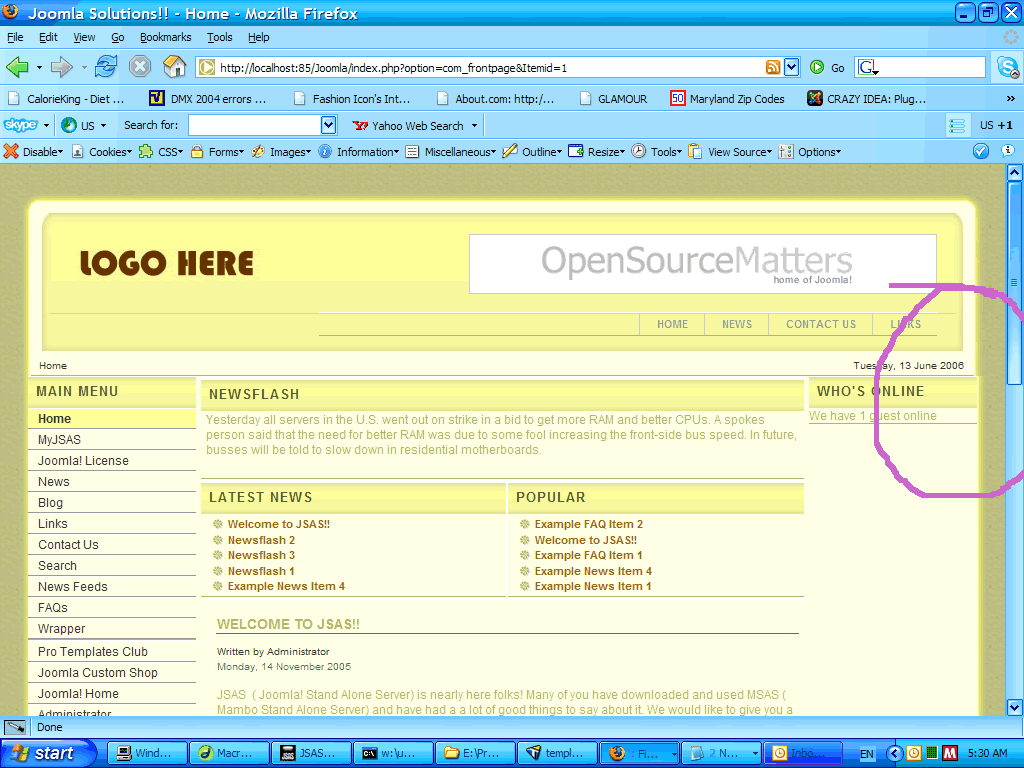
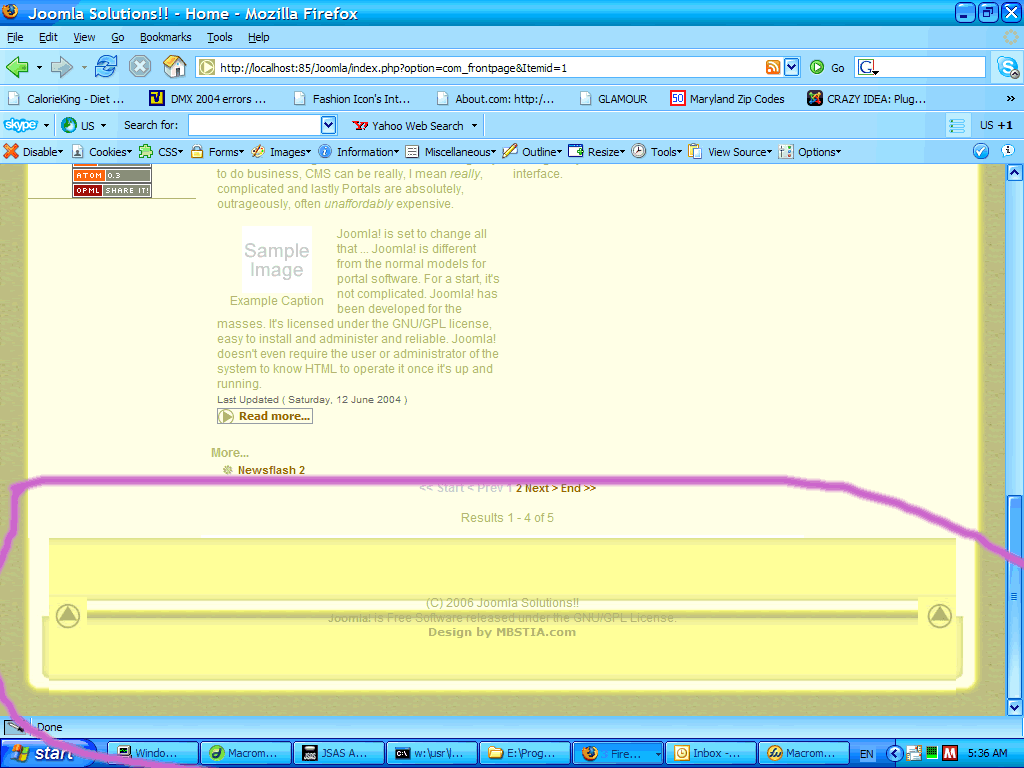
Hi, Is anyone around here familiar with Joomla! and thier templating format? I am brand new to Joomla! and to templating. I have been delving into all the tutorial threads I could find on the Joomla! fourms and on the web and have had a go at modifying an existing template to practice and learn. I have run into a strange error where my layout's sides aren't in the right place (they are off a bit) and my bottom (footer) image seems to be repeating itself in a strange manner. I can't figure out what I have done wrong. I have attached an image of the top and of the bottom of my layout so you can see what is happening. See pink circled areas. I have also attached the zip file of the template files if anyone would be kind enough to have a look at the files and point a newbie in the right direction. I know that tableless design is the new way to go, but I am not quite there yet with my CSS skills and still learning both CSS and PHP. Thank you so kindly for any help you can give. premiersound.zip
-
Just in case anyone runs into this topic. I think what I did wrong was that I did not have the path to ImageMagick set up correctly when I first installed the Gallery script. This may have messed things up. Be sure to have the correct path in first before you upload a bunch of images. All is working fine now. Thanks again Dave... if you had not mentioned the amount of images I would not have tried deleting some and running the resize/thumbnail tool with a lower amount of images. You helped and I thank you!