MikeJ
-
Posts
2,369 -
Joined
-
Last visited
Everything posted by MikeJ
-
If you've ever done any real work with computers, you will know that any time a big change is made, there are sometimes side effects to making those changes. This is one of them. TCH just needs to evaluate the best route to fixing this without causing additional negative effects. Quite frankly, when we have offered to help people in the meantime by just asking you to submit a helpdesk ticket (i.e., follow proper protocol), so we can be aware of individual cases we can test with, I don't understand why you feel you must respond like this claiming we won't allow you access to ImageMagick at all.
-
It was me, but I'm not the one who makes those decisions for TCH. You won't find the rest of that thread as it was posted in a private area. Submitting a help desk ticket will allow you to get a quicker response (as I don't believe this has been fully reviewed yet), and also (even though we know about the issue) emphasize who and how many are in need of it to be changed.
-
I'll try to give you the brief version without getting too confusing. When you create a domain (example.com) and want to host your own name service, there are really two parts to setting that up. First, you have to create the name servers (ns1.example.com and ns2.example.com ... the actual names can be anything you want, it's primarily used for human consumption) and register them. The registering of your name servers is done through your registrar within your domain management interface for the domain (example.com), often called domain host registration or something similar (depends on the registrar). This creates records in the registry for them so that they can be accessed without having to do name lookups to your DNS first. Then, once you have done that, you can define those hosts as your name servers for the domain, just like you would if the name servers were run by someone else (like ZoneEdit). Now, the full above process is only required for the domain the name servers reside in, i.e., example.com above. If you have another domain example2.com that you want to use the same name servers, you just define the name servers the host uses the way you did before, but with ns1 and ns2.example.com as the hosts. The reason two domain name servers are required to be defined as a minimum is for redundancy. That way if one goes down, the other will still resolve names as if your name service is unavailable, nothing in your domain will work anymore even if those hosts are still up. The way this is often handled with low cost dedicated servers (the ones customers rent) that don't have the resources to set up multiple DNS servers is to use two IP addresses on the server and assign a nameserver to each one (in the registrar). Some registrars will even allow you to assign both DNS servers to the same IP address, but some won't. Most likely in your scenario, this will probably be what you want to do... if you can get two IP addresses on your windows server, then use both as name servers, just make sure your Windows DNS service is listening on both addresses (it's been awhile since I've used Windows DNS, so you'll have to look that part up, most likely by default, though, your Windows services will listen on all available interfaces unless you explicitly define otherwise). Just keep in mind, though, that if you do this, and your windows machine goes down, you will lose DNS service for your whole domain until the machine comes back up. For better redundancy, and easier management, keeping your domain on ZoneEdit or a similar service is not a bad idea. Regardless, hopefully I made some sense here and this makes things a little bit more clear. If I just made things more confusing, let me know and I'll clarify.
-
It's real simple.... Drink. Don't think.
-
I'm not so sure about that myself. Mainstream is not always a good thing.
-
In addition to helping TCH out, I also have a dedicated server with them, so if there's enough interest in a dedicated server forum (the bigger issue is I don't think many dedicated server customers use these forums), and TCH ok's a dedicated server forum, I'd have no problem being the acting mod/sponsor for it. It could be a more appropriate place for system level information that doesn't pertain to shared customers.
-
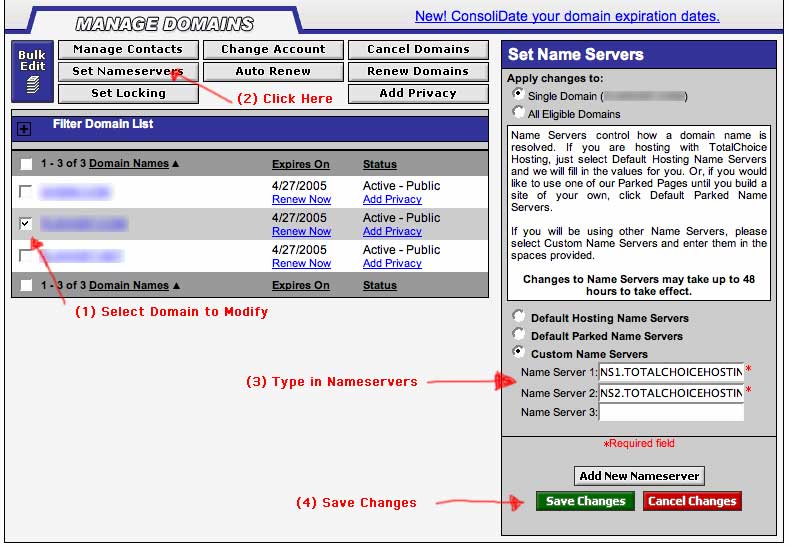
To make it easier, once you log into your domain management, the following picture should walk you through setting up your nameservers properly.

-
Just make sure you backup the DB of the same version of Guestbook. The DB structure changed some between versions.
-
drd333 is on a Mac.
-
No.
-
We currently don't have any dedicated servers available, is what Mike was saying. That may change in the next 30 days or so. Dedicated servers come with cPanel preinstalled unless you specify otherwise. You do not have to pay for a separate cPanel license. You can create reseller accounts for others with this cPanel. Semi-dedicated accounts follow all of the same rules as a shared account, which means you cannot create reseller accounts under your semi-dedicated account for others.
-
To add to that... Secure SMTP: port 465 Secure POP3: port 995 Secure IMAP: port 993 Available on all the servers. Not to mention secure webmail: https://******:2096/
-
My advice... use a different IM client for AIM. Trillian (www.trillian.cc) is one that many Windows users swear by (they have a free and a pay version). It supports AIM as well as other IM services, and you won't get any ads. They are also pretty quick to update their client if and when the different IM services try to block them.
-
I'm sorry you haven't gotten a response yet. Part of the reason for no sign up forms for Dedicated Servers is that we are currently out of them, and I don't believe we currently have any new ones coming in. However I'll get Mike, the operations manager, to respond officially on where our dedicated server sales stand.
-
Yay!
-
The error is coming from the host you are ftping the file to. It appears it doesn't have permission to write the backup file to the remote host anymore. Check the permissions on your backup machine.
-
I still keep the virus called Microsoft Windows on one of my machines... woooot
-
Ahh...the fun with marketing. Drop your prices substantially when you are almost out of stock, and let all your "price matching" (possibly well stocked) competitors eat the loss. Naughty
-
Debian is a distribution of the Linux operating system (originally created by Linus Torvalds). BSD (Berkeley Software Distribution ... created at UC Berkeley originally) is a whole different Operating system (with multiple derivations as well). OpenBSD (put together by the same people who provide the most commonly used SSH software, OpenSSH) in particular is often considered one of the most secure operating systems due to their intensive auditing process (team of people who continually audit the software looking for security issues) and the fact that they distribute the OS in a secure by default configuration, so that all but the most essential services are off by default, and the user has to turn on services that they want... unlike the more common method of shipping an OS with most services enabled by default including many that may never used by the end user, leaving more potential security risks. Of course, with all that said, you might ask, well why then doesn't everyone run OpenBSD, and that comes down to functionality. Although BSD and Linux are both Unix variants, Linux today is more popular than BSD, and generally has more 3rd party support in the way of applications being ported or written for it.
-
TCH takes any and all security issues seriously and does act on them, as well as taking preventive measures to minimize risk to our customers accounts. However, in the case of someone spoofing your address as appears to be the case, it doesn't matter who your mail provider is, because it's someone else sending them from another network not related to your email provider.
-
Correct.
-
From a shell while the load is high: First identify if mysql is the process eating up the CPU by running "top" and watching for what processes stick at the top of the list. If mysql is showing a lot of cpu usage, as root run "mysqladmin processlist" to show what processes are running in the database, and from that table you see, you might be able to track down the culprits. You can also run "mysqladmin status" to see how many slow queries show up. If it's something else like a long running httpd (apache) process running, you can get some info by taking the process id (PID ... first number listed in "top" next to the process) and run an "lsof -p #" where # is the PID. This will show you all open files for that process and who's connected to it. There will be a lot of junk listed (like all your domlogs will show up)... what you are really looking for is things like "/home/someaccount/public_html/..." to find out which account the process is accessing, and you should also see what remote system is connected to that process (look for the :http connection). Those might help you track it down if your willing to dig enough (you can often go from there to your domlogs and look at what the traffic is accessing). If it's just an external script that's eating up CPU (like a cron job), it should be pretty obvious in top. As you said, there are many other things you can do, but there's a couple basic ones that might get you started. P.S... a load of 1 isn't necessarily bad, but seeing your 15 minute load average at 8 definitely means you do have something pretty intensive running on there.
-
The $79 plan is semi-dedicated, not dedicated. As far as I know, those are still available. It would give you more space and bandwidth (semi-dedicated 10 GB space, 95 GB bandwidth, versus the highest shared plan of 2 GB space, 55 GB bandwidth). I would probably recommend just waiting a little bit, though, and see how your bandwidth for the month is shaping up first. You may find 55 GB/month is more than you need. If not, it's pretty simple to upgrade.
-

Need A Permanent Redirect On All Files
MikeJ replied to !!blue's topic in CPanel and Site Maintenance
Yea... I'm actually using Alex's method (I guess I did republish all my mt-blog entries as redirects). I haven't tried that new method yet. -
Need A Permanent Redirect On All Files
MikeJ replied to !!blue's topic in CPanel and Site Maintenance
Something like this should work if you just want to blanket redirect all requests for /archives/* to archives.php (make sure this goes into the .htaccess that's in your blog/ directory): >RewriteEngine On RewriteBase / RewriteRule ^archives/(.*)$ archives.php [L,R=permanent] Wordpress, however, *does* have the ability to translate MT entries to WP entries through .htaccess rules so you can still have links that are in search engines go to the correct entry.