Mav2u
-
Posts
124 -
Joined
-
Last visited
Everything posted by Mav2u
-
What Version Of Php-nuke Is Installed?
Mav2u replied to Mav2u's topic in CPanel and Site Maintenance
Ah, I new that bugger was located somewhere on there. What about figuring out the version on the Cpanel? -
Okay, how do I know what version is currently offered in Cpanel? Also how do I find out what version I have currently installed? I don't see a version number anywhere for either? Thanks, Mav
-
You gotta watch what css syntax choices you make. Not all of them work with every browser, or every version of that browser. This link here will help out a little, it give tutorials plus it also shows at the bottom what css syntax works with what browsers. The best bet would be to try the book I mentioned earlier from HTML Utopia: Designing Without Tables Using CSS. Try the w3schools.com site. They have many tutorials and other info on css. Mav
-
I would also like to point you to some css resources. thenoodleincident.com/tutorials gives links to his and other peoples resources on doing css design. Or you could just look at his already finished CSS design templates at CSS Box Lessons Here is another layout site for learning, CSS Layout Techniques: for Fun and Profit bluerobot has some nice ones also. Or this one has many layouts with compatibility browser listings. Nemesis Project These sites should give you a good start on figuring out what you wanna do. Also some good books on CSS design out there also. A few books I like are: HTML Utopia: Designing Without Tables Using CSS and Cascading Style Sheets: The Designer's Edge. I have both books I just bought last month and I enjoy the information contained within, they are very informative and straight forward. Mav
-
I like the Western Digital HDD's. I have all four computers running them and only one has failed because a power supply blew and it took the board and HDD controller on the Western Digital. I called Western Digital and had a new drive in the mail within 3 days, sent the old one back and went on with my life. I now buy the 8mb versions of Western Digital since they have the three warranty now. All others only have a 1 year now as do most other manufacturers. Oldes Western Digital is in my 233 mhz, running darn near 24 hrs a day 365 days a year since June 1997. Any Maxtor I've purchased with out the liquid bearings has died within about 2 yrs or less. That goes for my friends who have purchased them also. Not sure if it's just bad luck or what but I don't buy them anymore. You could have spent a little more on the video card and got an ATI All in wonder version. That way you could watch tv on the computer or edit video or anything if the need ever arised. But at least it's not onboard video! Mav
-
I'm sensing you have a lot of patience, and a lot of spare time on your hands. Awesome shot using panning technique! Mav
-
What forums are trying to integrate into your site? Mav
-
No it is illegal! If I take a picture of your artwork in another gallery and post a poster of it my gallery across town, that is copyright infringement. Plain and simple! Check the federal law on this, it is a fact. No permissions, it is illegal, unless consent is given or the proper copyrights to the the owner are displayed. Fines are up to 150,000 U.S. dollars for such infringements. Mav
-
Dats because I am reworking them again and haven't put the .htaccess link in for my php errors. I'll probably get around to it later tonight. Heck I might just change the whole darned thing again. Head Bash Mav
-
Very nice work indeed. Strange, but nice! I was going to mod my next case but whats the use after seeing those killer cases. hehe I wonder if you couldn't do a custom script or something that would allow people to access the images. Like php script or something that allows only those with the php code to allow the image to be linked and posted onto there site. Mav
-
Yeah, I'll just go down to Barnes & Noble and read the books on the shelf till I find one I like then order it through the college with my student discount. Going back to school is at least having one advantage for getting discounts. Dance Mav
-
I don't for see a problem with that being 777 chmod. I have a few folders that I use for php that I use with that setting because it does need to have full permissions to enact it processes. One of the TCH guru's will be able to tell you a little more about it for sure. Mav
-
I think you can use a 775 or even try a 644 and see if those work. But I guess it depends on what program your using. What script are you using? What's in the folder that you had to chmod to 777? Mav
-
Really, what does CrimsonSky do? Graphics, mods what? I'm curious now! Mav
-
Ah, then that would be bad then. I guess a solution would be to change the folder of the images are in. I guess it's a headache either way. Do you have the ip of who is doing the stealing? Do you know what the domain name is? Mav
-
Here is a current one I'm messing around with. I like Calvin and Hobbes so I just had to implement this one. Each error has a different comic. 404 error 405 error 414 error 501 error 505 error I'm still working on it though. I would like to just have a random image comic come up instead. But who knows, next week it will be something entirely different since this is like my 10th error setup in two months. Now that I look at everyone elses it makes me want to change mine again. Head Bash Mav
-
Cannot you not see what IP they are on in the stats page? You could block the IP that way I believe. Also, and this is a little harsh but will teach them good. I would also attempt to contact them and tell them to remove the contact. If no contact is possible, or they don't reply simply replace the images they are linking to with ones of " I'm stealing images" or " This image is being stolen" as the picture files instead. I would just rename you images for your own site if it's not to much work. Either way these are some ideas. Mav
-
Works like a charm Borfast! You got skills! Thumbs Up I was looking at the code going I know it makes sense but what am I missing in order to make it call the function. Soon as you posted it was like "DUH", staring me dead in the face. Head Bash The Text randomizer works good. I think I'm going to go pickup a PHP book this weekend so I can get some skills wit PHP under my belt. Can you recommend and good PHP books? I want to tackle the if and else and then portions so I can use the "HTTP_USER_AGENT" and make it say just the IE5 or NS 6.1 or what ever they are using instead of the long drawn out version. Thanks again for the assist Borfast! woooot Mav
-
How do you seperate the code into the existing code. I get an error when I just plop it into the rest of the code I posted earlier. I posted this into the code: It just renders the code for the random text and garbles everything else after it. I must be missing something in the insertion of this code into the existing PHP. It kinda looks that some how you couldn't use the echo since it would execute the quote right away instead of where I wanted it in the ImageTTFtext line for my code. I'm not sure on how to make the PHP so I can insert it so it functions like the: Mav
-
Sweetness!! Thumbs Up That's what the doctor ordered. I haven't had time this week to even fiddle with it. Had two exams this week, had to write my speech for class tonight just before I went in, (oops I forgot). I still rastled and A out of the teacher, nothing like talking about computers for a speech. Like that is something hard to do for me. But what she don't know, gets me an A, hehe. I'll try that out Borfast and let you know how it goes. I'm not sure why you would us a sql database unless someone had a but load of quotes or you had an interface which allowed you to change the quotes. Kinda like a cpanel interface using sql to store all the quotes or whatever. I'll give it a whirl though. Thanks a million for the assist! Mav
-
Digital Camera I have an Olympus 3040z digital 3.3 Megapixel with a cl1 tube adapter for Tiffen filters (43mm UV filter, and a Promaster 43mm Circular Polarizer Filter) I like my Olympus, it takes awesome night photos with it's 1.8 f stop. I've enjoyed it for the last 1 1/2 years. I'm constantly experimenting with it taking different types of pictures. I definitely like taking panoramics with the digital camera. Makes those nice scenic trips alot more enjoyable. Mav
-
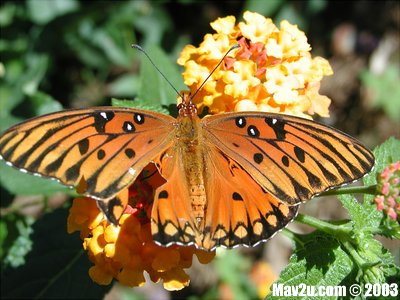
Here is another photo from Magnolia Gardens. I had to wait forever for a darned butterfly to land on a flower. Them crazy things don't stop moving for a second. Mav

-
Oh what the heck, I wanna play to! Dance This is a flower at Magnolia Plantation in S.C. that I took last year when I was stationed there in Charleston. Very nice place to take pictures as I'm sure Rickvz will agree with me. Mav
-
I'll post part of the code here that I have so far. I'm working on the random quote part right now. Well, when I get some time this week to work on it that is. I use a png file for my image, you can also use a jpg if you wish and I think a .gif file to. I have mine display the users browser info and IP address on the picture. You'll notice I have four lines for the text with each one repeated twice. The first text is white and the second is black but only one pixel off on it's alignment. I did this to produce a slight drop shadow effect for the text. You can leave it out or add it whichever floats your boat. Remember for each line of text you need to change the position of the next line of text. It also depends on the size of the font you use also. I find trial and error on this is a good way to see how it looks. After that you'll get the feel for how many pixels between the lines of text there should be. Now I'm working on the if and then statement portions for the HTTP_USER_AGENT and REMOTE_ADDR portions of the script so that instead of giving the long line of browser info it will say something like "You are using IE 5" or "Your using Netscape, stop now" hehe, had to add that in there. There are a lot of other nice features you could have fun with. Also take note of what Borfast said earlier on how to make your PHP a png or jpg extension and then direct the .htaccess file to still open as a php file. So when a user checks the pictures property it actually appears to be a png or a jpg file. This is adding to the illusion that it's a picture generating a text string, even when they save the picture it will have the text on the picuture. But in reality it's just the PHP file renamed with the png or jpg file extentsion. If you don't do the .htaccess trick, when you click on the file it will show up as a somename.php for the picture properties. Here is the quote from Borfast on how to do this. So if any other PHP gurus out there can add something to this script, please do so. Post it here so those of us lacking in PHP skills can have some fun with other options. I hope this helps a little. I'm not a PHP wiz or anything, but I do understand a slight tiny bit. Basically enough to get me into trouble and enough to change the things I want in a script. Have fun with the script and enjoy. I'll post other changes I do here also for everyone to play with as I go. I hope others will post their progress to, I like it when people share. That's what TCH forums are all about. Rock Sign Thumbs Up Mav
-
Oh well, not a big deal to me. I know what people are using out there for the most part. I also test my pages using netscape 4.7, 6.1 + and MSIE 5.0 +. These normally cover everyone. I really need to try out Mozilla and a few others people are using, normally most of my sites have no problem as I code them with W3 standards now. But that's what TCH forums are for, letting everyone else rifle through your site and find the bugs.....right? hehe Screen resolutions are now 800x600 default on almost all computers so I don't even bother with anything much lower than that on my pages, unless it's a special need. I have several monitors and computers with different settings, video cards, and monitor resolutions so I can see what they'll look like for the most part. I don't know what Mac's screens look like as I don't own one yet. Maybe someday, maybe indeed. Mav Rock Sign