Mrs. Muddled
-
Posts
392 -
Joined
-
Last visited
Everything posted by Mrs. Muddled
-
Hi there! My website is http://www.mrsmuddled.com It's a personal website where I talk about my career in policing and ramble on about ... stuff. I hope you will enjoy my various missives. I got a kick out of writing them. I've added the TCH text under my opening page. Just let me know if I did it wrong. You may recall, HTML was never my strong suit.
-

Windows Vista Icons Lower Left Corner... Mine Gone ....
Mrs. Muddled replied to Mrs. Muddled's topic in Operating Systems
I'm embarrassed again. I must remember to come back onto the forum when I have success. Yes, I was able to get that switch between windows thing working again on my identity. I use it all the time. I have absolutely no idea what solution finally worked for me, but ... all is well. Thank you for your attention. -
It is Desktop - my name - downloads Sorry for the delay in answering. Must have been one of those brain freeze things.
-
When I get notice that there is a new update for some program I have on my computer ... I download it and assume it finds its way to whatever program needs updating. That file apparently goes to my downloads folder. My question is: When I see all those .exe files in that downloads folder I realize I have assumed that those updates "automatically" updated whatever program they were associated to and I need take no further action. Am I correct ... or are all those .exe files in the downloads folder waiting for me to activate them? I just delete them assuming they are superfluous. Yes, I realize I am probably confirming how totally clueless I am about some things to do with this computer! Deal with it! My brain is old!
-
... where did they go? When I log in to one of the standard users on our computer .... in the lower left corner of the desktop are two icons. One says Show Desktop, the other says Switch between Windows. I don't have either of these icons on my administrator account. Why? I would like to get them back and I can't figure out how. Your help appreciated.
-
What exactly is NOT restored if I do a system restore? I've change the standard login names ... only mine didn't disappear with the MS fix. Would those login user names go back to what they were before I changed them yesterday? What about my husband's emails? Would all those old folders ie sent, delete, other saved folders come back? I've changed a ton of stuff to do with my USERS. I've made different login names. Had to re-sign up three users with our ISP.
-
Many thanks for your thoughtful replies. I appreciate your attempts to assist me so much. Why I never thought of this before escapes me ... but ... all I had to do to find all those missing emails in d.h.'s files was go to search and type *.eml and every single email that's ever been saved to this computer is there! He's happy. I'm happy. For what it's worth ... we use Windows Mail not Outlook. His account was still showing in user accounts. Everything was there. The tech from MS was somewhat difficult to understand and I had clicked on and selected everything under Tom's user name and copied it over to the new Tom2 user file I started. The tech apparently didn't want me to do it that way. He wanted me to do the copy and transfer bit by bit ... starting with his documents. I don't really understand his reasoning ... he said something about him ending up with double folders (or something like that) but there you have it ... he's up and running once again. Thanks again for your attempts to save me from myself.
-
Thanks for the reply Dick. I probably was not clear in my description of the problem. Actually ALL of my files are okay ... the file that was corrupted when MS did their fix was the file that controls the logon icon that the satellite users of my computer (my husband) use to log in. So when the computer turns on what I see is ONLY the log in icon with my name on it (I am the only administrator on the computer). All of the files are still in the computer and I have been able to rescue all of his files and copy them to a new name I have given his log in. What he lost was his connection to shawmail ... our ISP. So I re-registered his email address under his old name and password. I got all his new un-read emails back and all his contacts are in place. What has disappeared is all his saved email folders - of course with lots of info he did not want to lose. The drafts, sent, deleted files, all empty. I tried calling Shaw but they blew it off saying it is a Microsoft problem. The tech seemed to think MS could find those folders. What do you think? Now I'm a little skittish at the thought of letting MS back into my computer to try to fix it ... for fear they make a worse mess.
-
Okay ... this is my second attempt to write this. Yesterday I had a staff member from Microsoft working on a fix to do with critical updates that would not install. I gave her access to my computer. That problem appears to have been fixed. Today we discovered that all of the user icons that are usually on our desktop have disappeared, except for mine. My husband is none too amused. Is there something really obvious that would enable me to fix this? Yes, I've left a message with MS for call back. I'm getting antsy.
-
No Group Option On My Windows Mail ... Why?
Mrs. Muddled replied to Mrs. Muddled's topic in Operating Systems
My apologies for never getting back to you with the solution to the Missing New Contact Group button in Windows Mail. Apparently this is not an uncommon problem. Here is the fix. It worked immdediately. http://www.vistax64....on-missing.html -
I use several group mailings on my Windows Mail. I went to set up a new "group" just now and there is no option to do this ... at least not that I can find. Am I missing the forest for the trees here? It's on my husband's side of the computer but has disappeared from my side. I'd like it back! MM P.S. Looks like there have been some changes around here. I feel rather uncomfortable.
-
Should I Say "yes" Or "no" To The Installation?
Mrs. Muddled replied to Mrs. Muddled's topic in Operating Systems
THANK YOU so much! What would I do without you? -
Should I Say "yes" Or "no" To The Installation?
Mrs. Muddled replied to Mrs. Muddled's topic in Operating Systems
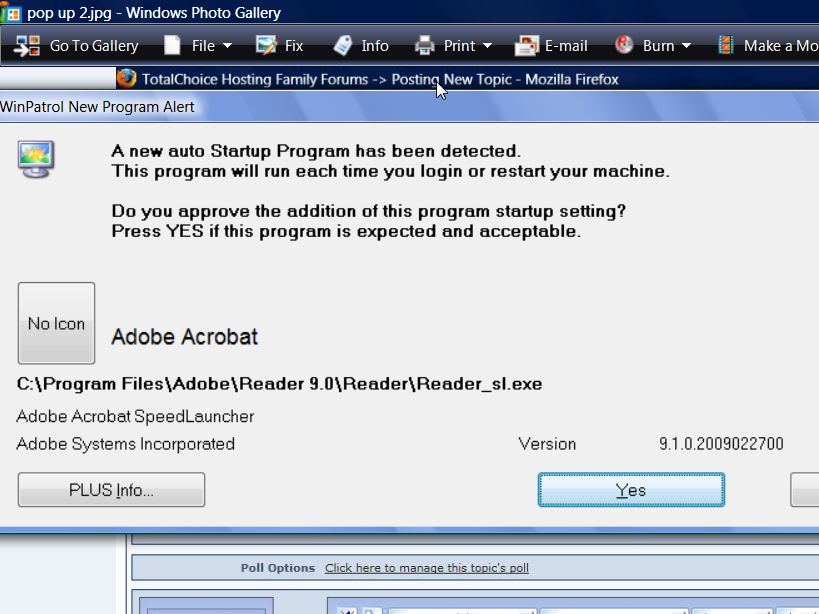
This is the screen
-
Should I Say "yes" Or "no" To The Installation?
Mrs. Muddled replied to Mrs. Muddled's topic in Operating Systems
Actually I wasn't "doing" anything. I just happened to come into the room and there it was on the screen. WinPatrol had sent up the alert asking for a yes or no. The only thing I can think of is yesterday I did the latest Microsoft update .... do you think this has something to do with that? -
Hi! What is this? Is it something I should okay ... or not C:\Windows\System32\msxml3.dll XSL Template Thanks guys!
-
Yes, I've already done all the obvious and the msconfig. There is nothing in start up that shouldn't be there. However, when I look at start up in WinPatrol, different files show up. The one that I don't recognize is launcher.exe. Is that a program you are familiar with? All the rest look familiar. I've googled the file and it appears harmless. I don't see any connection to Adobe. After getting the Adobe popup a zillion times, it seems to have stopped. Of course I haven't turned off the computer, so it may start up again tomorrow. Did you look at the screenshot of the list? Did you see anything there that you would want to delete? Just noticed launcher.exe does not show on that screen shot ... hmm?
-
-
The "no" button in WinPatrol does nothing. The Adobe program keeps restarting itself even though I hit the "NO" button in WinPatrol. WinPatrol gives a good write up on how to deal with these repeats. My concern is: I don't want to start killing off programs and end up killing a program that I need! I am hoping that someone "out there" will spot the culprit (s) on my list and let me know which ones to get rid of.
-
I just downloaded an update from Adobe Acrobat. I don't want it starting up with my start up. I am now dealing with repeating alerts every couple of minutes. I've printed out the instructions from WinPatrol on how to stop these groups that have obviously been designed to replace the data removed by WinPatrol. I'm unsure which of the programs in my Active Tasks are the culprit. Need your advice before I do any killing of tasks.
-
Getting A Page Load Error In Firefox - Why?
Mrs. Muddled replied to Mrs. Muddled's topic in Software Talk
I've been going back into my Firefox options and clearing it. It isn't helping. I don't have any cookies blocked ... at least I don't think I do. It must be something to do with firefox. I particularly have a problem when I sign into Yahoo and then try to open a news article. Once in awhile the article will open. -
Getting A Page Load Error In Firefox - Why?
Mrs. Muddled replied to Mrs. Muddled's topic in Software Talk
I spoke too soon. It's started again. -
Getting A Page Load Error In Firefox - Why?
Mrs. Muddled replied to Mrs. Muddled's topic in Software Talk
Well, the first one I had already read and didn't appear to fit my situation. I just had success with the second suggestion and so far everything seems to be working normally again. I can't figure out why all of a sudden the "problem" started. Thanks so much for your reply. Now if I could only figure out how to make Internet Explorer work. It is really hopeless. -
Why am I getting this pop up consistently when I try to redirect. This particular time I was in my Yahoo mail and I tried to open a Hollywood gossip story (I MUST know what Paris is up to! ). This is what came up. I deleted Firefox and reinstalled it a couple of days ago. Didn't help. I hate to give up on Firefox. My IE is absolutely hopeless. It takes so long to do anything I forget why I sat down at the computer. I haven't made any changes to my cookie settings.
-
Words On Webpage Appear Typed Over Each Other - Why?
Mrs. Muddled replied to Mrs. Muddled's topic in Software Talk
Aha!!! I followed your instructions. I had to change it quite a few times before I got it small enough that it cleared the problem. BUT! Now the font on my screen is so tiny, I can't read it! I guess seeing as the problem is only on that one website, I'll just have to deal with it there. At least now I understand what caused it. Thanks a million Thomas! MM -
Words On Webpage Appear Typed Over Each Other - Why?
Mrs. Muddled replied to Mrs. Muddled's topic in Software Talk
Thomas! You are BRILLIANT!!! NO! The website is PERFECT when I use Internet Explorer. Go figure? I don't use IE because it is so unbelievably slow I would call it dysfunctional. I've never been able to "fix" it. So, why is Firefox doing something like that? I'm a big Firefox fan. I guess my next question is: How the heck do I fix IE? I know I've already posted about it. Everything I tried was a waste of retirement time. MM