webgyrl
-
Posts
894 -
Joined
-
Last visited
Everything posted by webgyrl
-
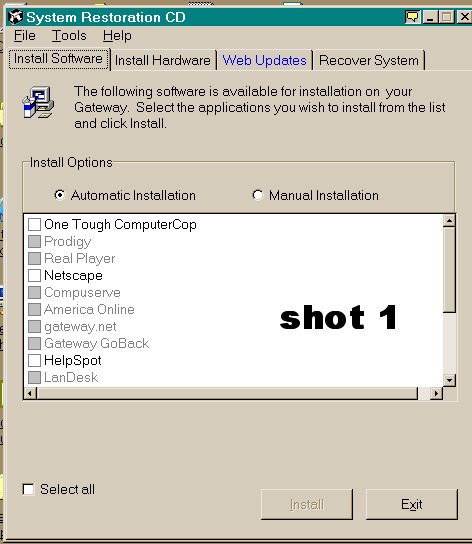
sorry.. crashed again grrr OK will be linking a series of screenshots to show you the system restoration cd contents:

-
Just checking the Gateway System Restoration CD and it lists the following: Partial Backup of System Software Hardware Drivers Windows 2000, Windows 98 or Windwos 95 restoration Program NT4 Driver Locator utility Let me pop this in my CD ROm and read exactly what software there is.... Be back in a few minutes Nat
-
Bob, OK sounds good. Forgive me for being so ignorant on all this... I just want to make sure I do this right. I don't mind about loosing everything I have on this system. I have all the software disks and I have backed up all of my files etc. I think XP Home has a "Go Back" type of thing on it so I don't need Gateway Go Back installed. I don't think it came with anything else except the seperate Microsoft Office 2000 CD and that I can install on XP seperately as it is not on the SYSTEM RESTORATION CD. I am concerned about the drivers, but I have most of them on a CD ROM. My big concerns are that I installed a new CD RW Drive and a second Hard Drive (D) and I don't have drivers for these. I am trying to find them and put them on disk. The CD ROM is a Sony CD-RW CRX185e1 and I can't seem to find that Driver on Sony's Optical products site. The second drive is listed as that GENERIC type IDE Drive, and for the life of me I can't recall the manufacturer. I think it's Seagate, but I have no idea. Should I be concerned about the CD ROM and the second hard drive drivers? So you are saying that I should shut down my system, pop in the XP Home Upgrade CD and go from there? I guess if I do that I then don't use the System Restoration CD that came with the system from Gateway? I also have their partial backup disk that has drivers on it etc. Is there a site or an article that would list the step by step proceedure for this. I am a bit scared about doing all this, as I'm sure you can tell. Thanks SO much for the help. Nat
-
Why do you not recommend wiping the drives and resinstalling WIN 98SE and then doing the upgrade? I am just confused as I don't want any remnant of anything on the drives. If my registry etc is all messed up wouldn't this be the best procedure? My main concern here is that both my drives are an absolute mess and that the registry is screwed up. I really want to wipe out everything and start from zero. Just out of curiosity, why is the Zero out thing not necessary? I read that if you don't do this there are still some remnants of whatever was on the hard drive left over. Are you guys saying that just reformatting itself would wipe out any bad sectors or virus remnants etc? Thanks for all the suggestions, keep em coming. I am planning to do this all tomorrow. Nat
-
If you have reformatted or wiped a drive before, can you please check out this topic in HARDWARE: http://www.totalchoicehosting.com/forums/i...showtopic=12738 Thanks, Nat
-
What about using: http://www.killdisk.com/ Any thoughts?
-
Bob, Yeah, sorry about all the questions. The reason I want to zero the drive out is because I want it to be like it was from the factory. In fact, the system was screwey when I first got it from Gateway and thier tech support had me wipe the drive and reinstall WIN 98 in the first week I had it. When I first got the system I really had no idea about computers and I know I got a virus or two in that first year and also I really have messed up the registry. I just want to have the drives as clean as possible before I reinstall and upgrade the OS. I read that writing zeros to the drive is the best way to do this. I do understand that one tends to do this when selling a computer, and yes, I do want it that clean. As if I am starting from scratch basically. As for Fdisk etc... will I do this at the c:\ prompt? I will read over that link you left. Thanks Nat
-
Heya! Sorry I haven't been around for a bit. Having some major puter troubles as of late. No virus, did the checks with AVG and Norton... just having major program loading issues, clutter, certain web features not working (like Media players) and a lot of other things. I think the drives I have are taxed and I also need to upgrade to XP- it's time! 4 years of beating this beast has run it into a big mess and I can't yet replace the system with a new one. So I figure wiping nad reinstalling plus the upgrade will buy me a bit of time.. I hope anyway. So, was wondering if anyone out there could give some advice on how to wipe out both drives on a two drive system. First drive is a 10 Gig C drive, second is a 38 GIG D drive. I would like to reinstall WIN 98SE and then I have the Windows XP HOME upgrade CD to upgrade the OS. I have backed everything up (30 CD-Roms later!) and need to know the best way to totally WIPE and reformat both drives. I was reading somewhere that I have to do some procedure to ZERO out the drive and that just reformating with my Gateway system restoration CD is not enough to totally get rid of everything and start over again CLEAN. Some articles state to only use a low-level zero-fill or diagnostic utility designed for my particular hard disk and that I can download one for free frommy drive manufacturer's web site. When I look at my system properties in the DEVICE MANAGER it states that I have these two drives: GENERIC IDE DISK TYPE1 GENERIC IDE DISK TYPE2 So how do I know who the manufacturer is. I think the second drive I bought is a Seagate drive, but I totally can't remember now. Does anyone know where I can get one of these Zero fill utilities? When I reformat, do I do D drive first and then C drive? Will my second drive need a driver at all? I added in the 2nd drive myself a few years ago and I can't recall that it came with any driver software. I read somewhere about "Fdisk". Can someone tell me about that or point me to an article that discusses what that is? I had trouble getting a boot disk made from START -> SETTINGS ->CONTROL PANEL -> ADD/REMOVE PROGS -> STARTUP DISK It said something was missing and even when I popped in my OS disk it couldn't make the floppy disk.. so I got the WIN 98SE boot disk files from www.bootdisk.com. Wil that work OK? I have a CD ROM with all my drivers on it as well in preperation . The instructions I have for reformatting, say to do the following: 1.)Start system with boot disk and Windows Installation CD and wait till you get c:\ prompt in DOS 2.) Type: format c: /q What I want to know is that if I leave out the /q will it ZERO out all the sectors? Is this a bettere procedure than format c: /q Also, I if I do reformat and zero out, will my CD ROM drive work or is there something I have to do to get that working so I can reinstall the OS? I actually replaced the original CD ROM drive with another one, so the CD ROM drive is NOT the one that came with the original system, same goes for the Video Card.. but I do have a CD with the drivers... should I put those particular drivers on Floppy as well in case I need to load them from the Floppy drive? Just heading out to Borders to see if I can read up on this, but if anyone can help me out with some articles or pointers, I'd really apprecaite it. Thanks a mil! Nat PS. Anyone know about updrading BIOS? Right now I have Intel Corp. 4W4SBOXO.15A.0017.P12 Should I upgrade the BIOS and how would I do that?
-
Hi Jim, I've attached a screenshot showing what I am seeing here on both IE6 Browsers in this household. I am going to check the codes again and use that very useful and helpful info you gave. Hopefully I can correct the issue. It's happening on most pages on this particular site. Thanks, Nat
-
Thanks guys! Nat
-
This is very strange. Both my roomate and I see the line spacing problems in IE6 no matter how I try to tweak that code. I am running Windows 98SE and my roomate is running Windows XP. My screen resolution is 1024 by 768 32 Bit Tru Color setting and my roomate's system is 1024 by 768 32 Bit Highest Color setting. We are running cable connected via ethernet. Strange. Very strange.
-
Jack, Sorry.. I got sidetracked by a few things. I will get over to your forum to see if I can get to the bottom of this error when I get back to testing it. Thanks for popping in here. Nat
-
Does anyone know where I might be able to get a Date Script that displays like the one on this site www.recording.org See the left hand side where it shows date in this format: July 5, 2004 If anyone knows of a script that shows the date in this format that also has the time, I'd appreciate a link. I've been browsing HotScripts but haven't found exactly this format yet. Thanks, Nat
-
I have been going thru this code and I can't see where I haven't closed a tag... it is a lot to examine tho... so maybe I am missing something... The following is one of the pages that has the line spacing issues. Now, what is interesting is that these line spacing issues are only showing up when I view the page with IE 6. As you can see, the line spacing issue starts after the bit of code that displays the inline frame ticker. <ilayer id="tickernsmain" width=&{tickerwidth}; bgcolor=&{tickerbgcolor}; visibility=hide> <layer id="tickernssub" width=&{tickerwidth}; left=0 top=0></layer> </ilayer> Here is a link to the index page http://www.indiemanagers.com This is the INDEX page code:
-
Do you think these spaces have to do with unclosed TD tags at all? Could that be it? I am going blind from looking at code all night/morning... can someone check this page to see if the not closed TD is the culprit? http://www.indiemanagers.com Oh lord... my eyes are crossing.... LOL I have to get some sleep. I'll be back later on.... heee heee not much rest for the CSS challenged.
-
Just tweaking a form that used an older version of Ultimate Form Mail. I looked up this topic, did what was reccomended (cleared cache), but still getting this error: Anyone know a workaround for it? I get it on all 3 forms I have using this script... makes it hard to test... http://www.indiemanagers.com/memberseminar...armemberreg.php http://www.indiemanagers.com/register/register.php http://www.indiemanagers.com/seminarregist...egistration.php
-
Oh wait a minute... I just noticed that on my ForArtists page the table was set for text to be in the middle. Maybe this has something to do with it. Tho the table heights were very high. I set all table heigts to "0" on this one as well. http://www.natalie-brown.com/forartists.htm Looks like what I did fixed that. But let's see what happens when I make an edit and don't check or change the table height values.... BRB EDIT: hmmmm now there is a ton of space at the bottom of this page: http://www.natalie-brown.com/forartists.htm There must be another table in there that I am not seeing for some reason. EDIT 2: Yes, there was indeed another table... I guess the trick is to set all the table heights to "0" and make sure I get em all.
-
Well it looks OK now, but I had to resort to my old trick of going in to the code and deleting the table heigts. Problem is, when I modify the page and upload without checking and double checking those table hights I get that gap problem. If I set those heights to "0" on all tables, what would happen? EDIT: I set all the table heights to "0" and nothing bad seems to happen in Netscape 7.1 or IE6. Gonna check the other browsers. Would setting table height to "0" have a bad effect in older browsers? What would the reprecussions of doing this be, if any? Nat
-
Hmmm doesn't look fixed on my end. I might have put the <tr> and the <td> in the wrong spots. I added them here:
-
I think I fixed that one Don.. can you double check.. http://www.indiemanagers.com/industry_events.htm Argh... I can't figure out why this always happens in pages I design.
-
Yeah those table height values are up there sometimes when i check the code. I have no idea why that happens. Which link was this one from: <td bgcolor="#663333" height="30236" valign="top" align="center">
-
Yup... all those gaps... they shouldn't be there. They don't show up in IE6
-
Also found these on the site I am currently re-working: http://www.indiemanagers.com/membership_directory.htm (top) http://www.indiemanagers.com/industry_events.htm (bottom)
-
http://www.natalie-brown.com/biography.htm http://www.natalie-brown.com/community.htm http://www.natalie-brown.com/forartists.htm The forartists.htm page is by far the worst... I have no fix for these gaps...
-
Don, If you go to this page: http://www.natalie-brown.com/music.htm You will see there is a 'gap' at the top near the buy CD part and also there is another gap at the bottom of the page. I get these a lot in Netscape 7.1 Will see if other pages are displaying the same behavior. Nat