webgyrl
-
Posts
894 -
Joined
-
Last visited
Everything posted by webgyrl
-
Don, What is WHM? So the address to log in would look like this? https://server#.totalchoicehosting.com:2083/ Webmail would be the same except the ending would be 2096?
-
Ahhhhh! Thanks Don! Didn't know I had to use the whole address. Works perfect now! You rawk. Hey- another quickie. I remember somewhere here there was a post about Secure Login URLS for cPanel and Web Mail. How do I access the cPanel and webmail with the https secure URL. I know you have to put your server number in there somewhere. I can't seem to find that post, it was from way back. Thanks again! Nat
-
Hi! Just wondered if there was a Webmail tutorial anywhere? I am having this strange issue where I set up Web Mail accounts for one of my domains, but it doesn't seem to recognize the individual account username and password. I log on to the Web Mail link, ie: http://****/webmail/ Type in the User Name and Password in the Pop Up box ...and then it just keeps popping up a blank box and I can't use that specific account. I have tried using my MASTER login and password for the domain, and that works to log me on to Web Mail, but it brings me to the default Web Mail account and I want to log in to the Web Mail account I created in Web Mail controls in cPanel. Anyone know what I am doing wrong? To work around this problem I have to log on to cPanel and access the Web Mail accounts that way, but I am going to be creating some email accounts where I don't want the people to have access to cPanel, so I'd like to find out how to access Web Mail using the Web Mail URL. Thanks, Nat
-
Ah I did the SP 2 Update already! Seems that the network card is fine and i've been able to get online with no problems since that glitch. Will keep an eye on it. Will do a C defrag this week to see if it helps with the grinding noise. That is a bit strange for sure. I think you are right about COM 2. I deleted the COM in the Device manager. I am on cable for now so I don't need the modem active. If I do need the modem active I guess I will have to sort that out then, but I sure hope I don't ever have to go back to dialup. So far I am totally impressed by XP! This machine is running way faster now- everything is much more stable and so fast! I am still reinstalling software and tweaking settings. Probably will take most of the week to get it all done. I have to thank everyone for the help. I was terrified of doing the drive wipe and upgrade to XP but it went much more smoothly than I thought- thanks to all of the great people here. Thanks esp to you Bob for all your handholding and great guideance. Will post followups if there are any. Woot Woot! I am in the new age! Nat
-
Yeah good thing my roomie had that disk! I woulda been up the Gateway Creek without a paddle for sure!
-
So far so good. Just formatted Drive D (which is now E) and all went well. The only bumps I have run into so far are: 1.) I got an error message that said: your system is low on virtual memory. Windows is increasing the size of your virtual memory paging file. During this process, memory requests for some applications may be denied. For more information see HELP So it did its thing and so far I have not had this error again. Not sure what that was all about 2.) Noticing that my C drive makes a very loud short burst grinding noise after I Log In and load personal settings... like when it's loading everything in. So far I have Office 2000 Pro and Norton Internet Security Installed and nothing else. Not sure why this grinding noise is happening now. Kinda freaked me out because it did not do that under Win 98SE 3) Kind of a BIG issue with my internet connection: I have been doing the WIN XP updates via Update Manager and have been running into problems with my Internet Connection I did the first XP Update and it had to update the Update Manager software. It did the download and install then prompted for a restart. I did this and when I logged back on I could not access the internet. It's been wonky ever since. I logged on to my roomates system and searched and found a tip that says to go into the Device Manager and UNINSTALL the Ethernet Card. I have a LinkSys NC100 Fast Ethernet Adapter. The only drivers they have on the site are for WIN NT, WIN 2000, 95 and 98. I can't see that it's a driver issue as it is not stating that there is a conflict. It just is strange. I did a networking diagnostic and it FAILED. [00000001] LinkSys NC100 Fast Ethernet Adapter [FAILED} Request Timed Out I keep unistalling the network card, shutting down and then starting up and it walked me thru the Network thingy and then I shut down and it failed to connect to the internet again. I connect to the internet thru my Roomates XP Home system on a Cable modem. I have a CAT 5 cable linking to the Wireless G Broadband Router from my system. The lights on the back of the Card where the cable is are Green and Yellow steady. Any reason why the internet connection would be so weird? 4.) I have a strange COM Port 2 Conflict that I can't for the life of me figure out. It says: Device Cannot Start (Code 10) Anyone got any clue as to what this could be? I think my printer might be on this port and I know I have to upgrade the drivers from HP as it is not showing up. The printer is an HP 970cxi. Just going to install SP2 at the moment and then continue with driver updates. Then I will start installing software and files again. Phew... this is taking a while... but it is kinds fun despite the tense moments! LOL Nat
-
Figured out about Flock after I switched keyboards... duh- such a blonde moment FYI the OEM CD DID NOT WORK Had to use my roomates Win98 CD to continue installation. Gateway sux! So far so good I am at the part where it is installing the Start Menu Items. I converted to NTFS and it reformatted C drive before continuing with Install. Will have to reformat D drive from the XP utility after the Install is complete. What's weird is in all this blur I don't recall seeing a clean install option... but here have been a few tense and blurry moments... LOL Like when I popped in my OEM 98 CD and it refused to let me go... nearly went balistic and wanted to call Gateway and guve em an earful... But Natty calmed down... Hee Heee Nat
-
Ok something weird happened. I put the CD Rom in and it booted fine... went to the ELUA part and it asks to press F8 to accept, but F8 is not working... PG UP PG DWN and ESC work fine, but F* isn't working for me to accept the ELUA. Any Ideas? I just bought this keyboard- it's anew Logitech iTouch one.... very strange... I can't go any further. Nat PS using my roomemate's system to check this thread. I am gonna try using her keyboard on my system to see if that makes a difference.
-
Kevan Thanks man! I am gonna plunge into the deed tomorrow and see what happens. Thanks a million for the offer of help! Hopefully it will be OK. Let's all cross our cables... LOL Nat
-
Bob, Thanks a million zillion! I am going to do my final data backups and then proceed with the Clean XP install tomorrow. Will let you know how it goes... if you all don't hear from me for a while... well ya know why! LOL Nat
-
This is the email I got from Gateway, they sort of run rings around the whole OEM disk issue- so I am not sure what to do- guess I will go ahead and try the clean install from the disk and find out by trial and error:
-
Strangely I keep getting an error when I try to run that MS Upgrade Report and it freezes my whole system. I've tried twice with no luck Just came back from Borders and couldn't find any additional info. Gonna check email to see if Tech Support emailed me. Nat
-
OK looking over the disks that came with the system I have 1. One is a System Restoration CD the other is an Operating System Backup CD Version 98 So maybe I won't run into qualifying media issues. I emailed Gateway Tech support to find out about a BIOS upgrade and also about the whole XP Home upgrade issue and the authentification process. I will let you know what they say. Nat
-
Merci! Nat
-
I keep reading in all these documents that SYSTEM RESTORATION CD's from PC Manufacturers don't count as qualifying media. Anyone experienced this? I also keep running into the BIOS Upgrade warning. I searched for a BIOS upgrade for my system and can't seem to find one. Any ideas? Nat
-
Ok, so far this has the best info: http://www.winsupersite.com/showcase/windowsxp_sg_clean.asp
-
OK- So really what I would like to confirm is: Do I have to reformat the drives in DOS before I pop in the WIN XP Home Upgrade CD? If so, how do I do this in DOS? Nat
-
From here: http://www.webtree.ca/windowsxp/clean_install.htm Ok so far this seems to be a good route: If your computer is capable of booting from a CD-ROM drive and you would rather install using this method, then: Start your computer and then insert the Windows XP CD into your CD-ROM drive. Your computer should automatically detect the CD, and a message "Press any key to boot CD" will be displayed for 5 seconds. Press a key and the CD will begin to load files that are needed to begin the installation. This make take a few minutes. When asked if you wish to install Windows XP press Enter. You will be presented with the End User Licensing Agreement. Press F8 to accept and continue or press F3 to cancel the install. Select the partition in which you wish to install Windows XP and press the Enter key. The next screen asks if you wish to use the NTFS file system. This is the preferred file system, however, if you choose to use FAT32, you will not have all the security and stability features of Windows XP. If you previously had an Operating System installed you will be given a choice of Format options . Select the Format option of your choice. When asked to start the format, press the "F" key. The formatting process may take quite a bit of time. Setup will begin an automated loading of files which will take several minutes. ***Note - If you are clean installing using an XP Upgrade CD you will be asked for a qualifying product at this point. Just pop the CD for your older version of Windows into the drive while the XP setup completes an authenticity check. Following this you will be prompted for the XP CD and setup will continue. After this is complete the computer will restart. Leave the XP CD in the drive but this time DO NOT press any key when the message it "Press any key to boot CD" is displayed. In 5 seconds setup will continue. The Windows XP Setup wizard will lead you through the process of gathering information about you and your computer. If you are connected to the Internet XP will prompt you to "Activate". Do not activate at this time. You will be prompted periodically to activate but you have 30 days to do so. Remember though that at the end of 30 days, if you have still not activated you will no longer be able to access the Desktop. Information on WPA found here Technical Details on Microsoft Product Activation for Windows XP Following the Activation Screen you will be given the opportunity to Register Windows XP. Registration is optional and choosing not to register will not have any negative effect on your system. You will be required to enter your account password to gain access to the Windows XP Desktop. Is this the best way to do the CLEAN install... what about my OEM disk from Gateway... do you think I will run into problems because it is a Gateway OS disk?i
-
Oh lordy.... Just reading the bootdisk stuff and am here: http://www.aumha.org/win5/a/xpupgrad.php So it says these OEM CD's sometimes mess up the instalation. I am still reading through the article... but I am assuming that if I go the route we have discussed ie: popping in the XP HOME upgrade disk it should step me through a "NEW INSTALL". I am assuming I DON'T want to transfer files and settings... but how do I make sure both drives are REFORMATTED in this process? Has anyone ever done this specific kind of install to XP HOME?
-
Bob, Just read this Since I am upgrading to WINDOWS XP HOME, will this Advisor do me any good?
-
Oh about the Sound Blaster Drivers.... will the WIN XP software have them?
-
Where do I get these alternatives? I never had any luck installing Quicktime on 98 SE, will it work with XP? I am running a 550mHz w 256 MB RAM Thanks a mil! Nat
-
Bob, Thanks. I truly appreciate that people here are cool with helping those who haven't done these sorts of things before... and you know me.. always with the questions, questions, questions. I am downloading the Upgrade Advisor right now and will run that. So far I am thinking that doing this all from the Win XP disk is a better route... now for the sake of redundancy... my procedure would be as follows: Place WIN XP Upgrade CD into DC ROM Shut Down Start UP The CD ROM will activate and lead me through upgrade procedure Will I have a choice here to format BOTH C and D Drives or do I have to do this from DOS before? That is the part I am confused about now... when to do the drive reformat and FDISK.... BTW when do I do the FDISK and do I just type FDISK in to the DOS Prompt? Thanks, Nat
-
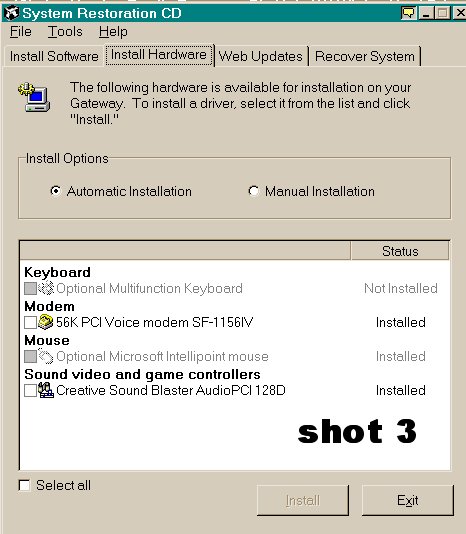
Shot 3 with hardware view I think I could still pop this disk in after using the WIN XP upgrade CD to install these drivers? Am I correct in this assumption? Also, I thought that WIN XP had some built in drivers for Keyboard, Mouse and Modem and I assume the latest Dirext X plugin would be on the Upgrade CD? Is that true? I guess I could try to find those SoundBlaster Drivers and have them on CD ROM... let me try to find the drivers somewhere.

-
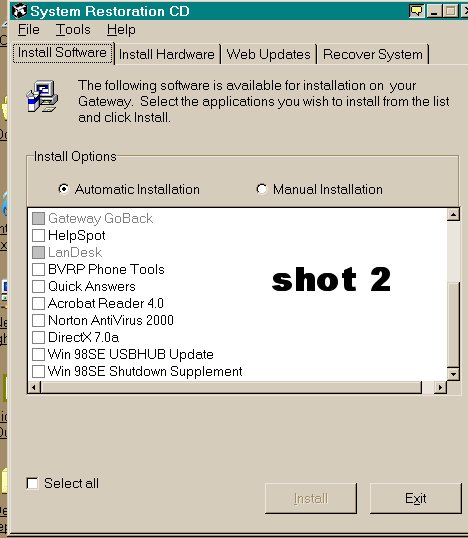
Shot 2 of system restoration software... so far I don't see anything I really need. I have a Norton Internet Security new version on CD ROm, I think Win XP has a system restoration utility built in and I can download RealPlayer and Adobe Acrobat Reader from the net later on....