Mrs. Muddled
-
Posts
392 -
Joined
-
Last visited
Everything posted by Mrs. Muddled
-
Thanks for the reply Thomas. I did spot the comments about Ruby Rails, but felt intuitively that I was in a foreign land and best move on. I guess I should have read all the posts. I've read them now. Didn't understand a word of it ... but I'll just add it to my list of "things to do." In the meantime, I'll wait a few days and try cPanel again. While answering your post I heard a "ding" and my mouse froze. It did that yesterday too - at a most inopportune moment. I'm going to move on down to the "mice and management" section and see if I can find someone I can communicate with about same. Heavens to Betsy! It's always something with this bloody thing! Regards, MM
-
Hi, Thought I should back up my website. I'm going to try making a webpage (I only use my blog on my website) with some mini videos with JAlbum. I've got "something" that looks sort of like a webpage here ... but before I make an attempt to launch this first page onto my website - I figure I'd better have all my ducks in a row. I've typed in www.mywebsite name.com/cpanel. I'm getting a blank page. Is it broken?
-
I am laughing. You guys have already got my number haven't you! You know I'd mess with this program and turn my computer into a lamp table ... right? Okay, Okay. I got the message. I'll delete the program and leave well enough alone. I read Pandora's box. I know what the ending was.
-
Okay, okay, I'll start digging around and see if I can find that old mouse. I really love my new "I Love Golf" mouse with the golf ball floating around in it! By the way ... point of interest ... today I slid the bar on the temp cache over to the right ... hoping it would help "the problem." So far today I've not had a freeze up. I had the slider set at 1 MB. Someone told me I needed to move it further to the right. What are your thoughts on the amount of disk space to use on the Temporary Internet Files Folder
-
... as in BUY a new keyboard and mouse? No! I was hoping it was a more benign problem than that.
-
Registry Mechanic. I just downloaded it to see what it was all about. It tells me I have 875 "things" it wants to delete! I started scrolling through the list. I saw my shaw cable stuff .... which means my virus checker and my spyware checker listed ... I saw all sorts of names that I consider "friendlies." What are your thoughts on this program? It certainly appears to be highly regarded from what I've read. I can't just let it run amok ... and 800 odd entries are a lot of decisions for me to make. Obviously I want my computer to run as smoothly as possible, and right now I'm having problems with freeze ups. Your thoughts?
-
Pretend you are talking to your Mother.
-
Steve, I tried the ctrl x and alt x ... just now. I just lost my cursor while I was on a website. Typical. Seems to happen when I am on a website ... not when I'm just writing emails. This time I could see the curser sitting over on the left of the screen. I had to turn off the computer and restart. Do you think it could be anything to do with things that are going on in the background like Google desktop or my security company? I'm still not sure what batteries were being referred to.
-
I'm wondering about your #3 option. I have all the computer stuff, a desk lamp and a TV in one power bar. The TV is usually off. Somehow I doubt it's that.
-
I have only tried Control, Alt, Delete ... and Esc. No luck. I've had to go as far as shutting off the power bar to get it going again. I use XP. I have 512 mem ... so I'm doubting its a memory problem. Lately I am getting regular "We're sorry" pop ups from Microsoft saying they had to shut me down. I usually click on the send report option. I can pretty much count on "something" interering with my work each time I use the computer now. I'm not sure what "batteries" are being referred to above. I have a plug in mouse. I don't have any viruses or spyware.
-
Hi! My cursor is disappearing from the screen while I'm in the middle of a task. The computer freezes up completely. I have to shut down the power bar to get a re-start. The button on the tower is also frozen. Tonight I found the cursor up at the top right corner of the screen. Dysfunctional. Usually I can't see it. The mouse is not a ball type ... and I'm not getting any other kind of skipping etc. What do you think is causing this?
-

Backups - Oh Lord, Save Me From Myself!
Mrs. Muddled replied to Mrs. Muddled's topic in CPanel and Site Maintenance
Thank you Thomas. I will "muddle" along. Regards, MM -
Backups - Oh Lord, Save Me From Myself!
Mrs. Muddled replied to Mrs. Muddled's topic in CPanel and Site Maintenance
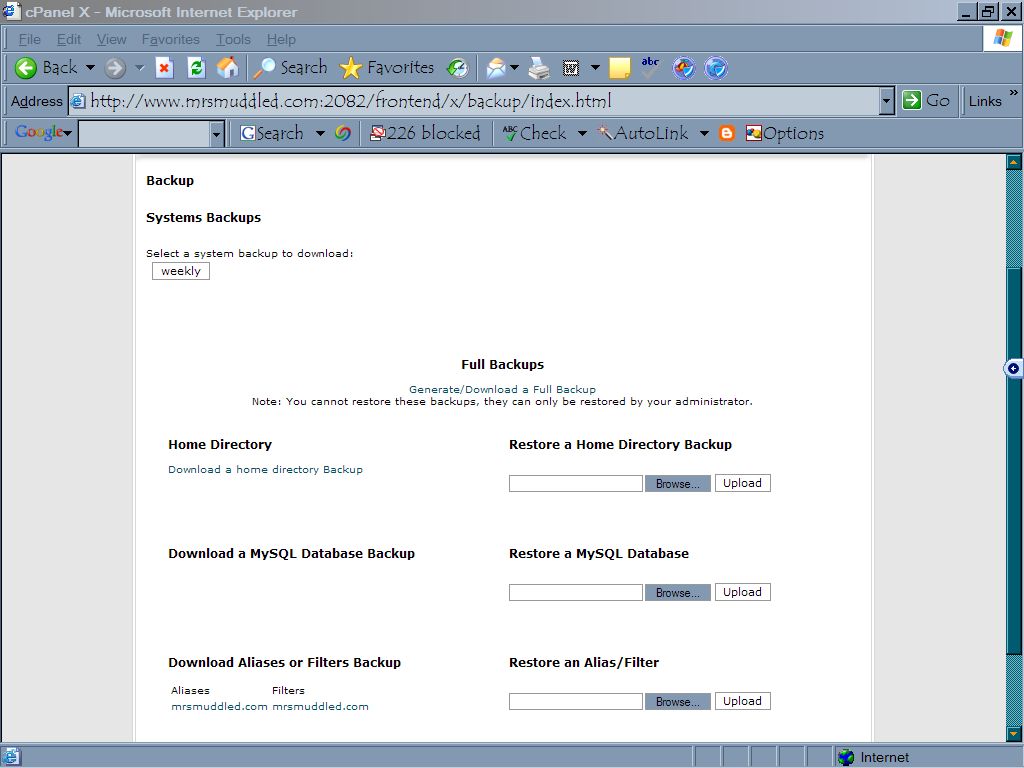
This is what I saw ... it was the restore a home directory backup that threw me off ... I must have clicked on upload. Anyhow ... I don't see anything negative in my blog so I will have to assume that whatever I did ... did not do any damage. So, can I now assume that because I have selected "weekly" ... my website will be backed up weekly at your end and not in my home computer? Do I just click on download a home directory backup when I want to update my home copy? Edit: TCH-Bruce uploaded image as an attachment.
-
Backups - Oh Lord, Save Me From Myself!
Mrs. Muddled replied to Mrs. Muddled's topic in CPanel and Site Maintenance
Thanks for replying Rob. I have looked at my site and everything seems to be the way I left it. The last thing I put on it was a painting of my granddaughter's ... and it is still there. What did I actually "do" when I hit that RESTORE key? Wouldn't it try to restore right back to the 11th of January when I first backed the home file up? I watched that blue line creep across the bottom of my screen and I had visions of my entire blog disappearing in a matter of seconds! I loathe sounding so ignorant, but fact is, I'll NEVER "understand" all this stuff ... my brain is just too far gone at this point ... thus my handle "Mrs. Muddled." It's a rather accurate description of me. I'll try to stay off the forum ... until I get really desperate. Cheers, MM -
In a fit of orderliness (I get these every so often - must be the phase the moon is in) I decided it was time to back up my website, which contains only my Blog. I've yet to graduate beyond that. This time I decided to do the FULL BACKUP, which I've never done before. No sooner had I clicked on that option than I decided to be really efficient and update the home directory that I'd done on January 11th. As soon as I hit the key I realized that what I was hitting was the RESTORE key from the home directory. Now I'm in full panic mode wondering what the heck I've done!!! I await your reply with baited breath. MM
-
Ah, there's that word again ... "confused." I have the a/m program and I use it for all my photo editing. Like it. I now have a Blog and I have a personal web page where I look at my Blog. Believe me, that in itself was a major achievement. My Microsoft Picture It Publishing program has a web ready photo album section. I've been playing with it to see how my photos would look on my website. I like the idea of being able to click "next" and "back" to view pictures. Rather than belabour the quandary I am in with this program ... I thought I would ask if there is anyone out there that is familiar with MSPIP, and if they can explain to me HOW I save my "new" album as an HTML file ... and get it back so I can work on it some more? I click all the suggested buttons ... the file appears to save itself to MY DOCUMENTS ... and I can't open it! If I do get it open, what I get is about 10 files, each with a tiny fragment of the original file. Also, are there any obvious negatives to using these pre-formatted pages that I should be aware of? Obvously I would want to be careful as to what personal info was visible in source. I'm not having any luck Googling the program. I guess because it's old. I await your sage advice.
-
No Don, I didn't do that ... hmm ... back to the drawing board ... sorry I posted this on the wrong forum ... man alive! Lost in the wilderness once again! Those passwords are so flippin long and convoluted I was going blind trying to copy it! I just wonder what happened to the nice password etc. that I made myself when I first joined the ranks here. I'll find the help desk and see what's up. I'm really hesitant to use one of those programs that remembers all my passwords. I just don't trust them. Thanks for the guidance.
-
Hi, cPanel will not accept my user name or my password. I just tried a new password etc., and still doesn't work. Am I missing something obvious again? While I'm at it ... can I just select and copy that horrendously long password and paste it into the space or do I have to type it? Cheers,
-
Gotta Problem With Windows Update For Xp
Mrs. Muddled replied to Mrs. Muddled's topic in Operating Systems
hee hee -
Gotta Problem With Windows Update For Xp
Mrs. Muddled replied to Mrs. Muddled's topic in Operating Systems
I downloaded Java. Now when I go into the tax website I am able to register. Whew! How have I managed to do without this Java thing for so long?!! I'm wondering now if that's why I can't play most of the videos on Oprah's website? Okay, so sue me ... ya, I went there ... just to see what her site was like. So, I notice there is a drop down for Sun Java tools when I go into TOOLS. I don't know what I should do with that list. Shall I just ignore it? A little bit of knowledge can be a dangerous thing when I'm near a keyboard! -
Gotta Problem With Windows Update For Xp
Mrs. Muddled replied to Mrs. Muddled's topic in Operating Systems
I'm going to have to start again on this topic. When I go to help and check on what version of Windows Explorer I have, it says 6.0. SP2 When I go to RUN VER it says 5.1. Why are they different? I am presently trying to access Canada Customs on the web. Ha. They are telling me I need Java Sun etc. When I go to Tools, Internet Options, Advanced ... I have nothing that says anything about Java! So, I'm thinking that maybe I need to download "something" from Microsoft for Windows XP ... even though my Windows Update for Windows XP says I have all the updates. Do you suppose I am confusing Windows updates with Windows Explorer? Anyhow, I don't know what to do and all the instructions on the Windows XP site just confuse the *%# out of me. This is what the instructions say: Systems Supported On Microsoft Windows Operating Systems (Windows NT 4 with Service Pack 4 and higher, Windows 2000 Professional Service Pack 3 and higher, Windows Millennium Edition, Windows XP Home edition and Windows XP Professional). Browsers Supported: Internet Explorer versions 5.5 & 6.0 (Microsoft VM, Sun JVM version 1.4.2_03); or Netscape Communicator/Navigator 7.02 (Sun JVM version 1.4.2_03). On Macintosh Operating Systems (Mac OS X 10.3.5). Browsers Supported: Safari 1.2.4 (125.12) (Sun JVM version 1.4.2_05). Note: In addition, all browsers using epass Canada must: support 128-bit encryption; have SSL 3.0 enabled; have Cookies enabled; have JavaScript enabled; have a Java Virtual Machine (JVM) enabled: Microsoft VM (Java Permissions); or Sun JVM 1.4.2_03 (1.4.2_05 for Safari) or later. To obtain configuration details for your browser, please refer to the What browser settings do I need to access epass Canada and epass enabled services? Frequently Asked Question (FAQ). After correcting your browser settings, please close your browser for the new settings to take effect. HELPPPP!!! -
Gotta Problem With Windows Update For Xp
Mrs. Muddled replied to Mrs. Muddled's topic in Operating Systems
Cancel the alert!! I seem to have solved my (latest) dilemma! -
I've just discovered my Windows version is 5.1 apparently there is a version 6 now and I've managed to miss it completely. I use Windows XP. I have auto updating. I decided to update all the XP stuff first and then worry about installing the new version of Windows. I had not been paying attention to the custom selection below the urgent stuff and found 5 updates for XP I"ve not loaded. I tried downloading the first couple singularly and re-starting the machine after each install. It worked fine till I got to these and it started hanging. I'm quite comfortable showing my abyssmal ignorance now. What's up here? High-priority updates Microsoft Corporation Windows XP family Security Update for Microsoft .NET Framework, Version 1.1 Service Pack 1 (KB886903) Download size: 1.5 MB , less than 1 minute A security issue has been identified that could allow an attacker to compromise your Windows-based system running the Microsoft .NET Framework and gain access to restricted data. You can help protect your computer by installing this update from Microsoft. After you install this item, you may have to restart your computer. Details... Don't show this update again -------------------------------------------------------------------------------- Optional software updates Microsoft Corporation Windows XP family Update for Windows Media Connect Download size: 6.5 MB , 2 minutes Windows Media Connect is the easiest way to deliver music, photos, and videos from your Windows XP computer to your stereo and television. Installing Windows Media Connect enables you to deliver music, photos, and videos that reside on your Windows XP PC to devices that support the uPnP protocol. This includes digital audio receivers, connected DVD players, set-top boxes, and more. Details... Don't show this update again Update for Windows XP HighMAT Support in CD Writing Wizard (KB831240) Download size: 0 KB , 0 minutes (Downloaded; ready to install) This extension allows you to create HighMAT CDs of your digital photos, music, and videos optimized for viewing on consumer electronic devices and player software. HighMAT CD Writing offers easier navigation and preserves important information about your music, photos, and videos like song name, artist name, album name, and genre. After you install this item, you may need to restart your computer. Details... Don't show this update again
-
Oh dear, that's a little bigger statement than I'd planned to make.
-
My baby grandson born on September 11th. Isn't he adorable!