acsteve
-
Posts
49 -
Joined
-
Last visited
Everything posted by acsteve
-
Well thank you Bruce. I got it. I however was not able to connect the way you were. I had to put the ip address in my c pannel or server390.snhdns.com either way it worked. I tried your way under host name, my domain.ext but could get no where. In any case I have it now. Steve
-
Yes and yes
-
I thought i would try another approach and program. I am trying to connect to my database i created in my c-panel but with no luck. It seems easy enough but it will not connect. maybe someone could help. Attached is a pic of the connect window for the program sqlyog. I have tried all that I know. I have put ftp.domainname like one does with dreamweaver which works in dreamweaver BTW. I have tried an IP address that is in my c-panel as a "shared address" I have tried http://www mydomainname, every way i can think of. Can we even connect this way.Any help would be appreciated. Thanks Steve PS attachment does not seem to work but hopefully some one has worked with this very popular program and can help.
-
Thanks Peter. I know pretty much about setting up databases, after ,much head bangging that is . I can not connect to a database that I have already created in my c pannel with Navicat. I am not sure if I need a port number or not but it does ask for one depending which way I try to hook up. I have tried the Http tunnel (do not even know what that means) and the general settings (the link you sent me) nothing seems to work. I wonder also if I should be giving my database user name and password, or my ftp name and my ftp password. I guess everything i am trying to say is. 1. do I need a port number.2. which info should i be feeding in, database name etc or ftp name etc? Any help would be greatly appreciated. Thanks Steve
-
Hello, I guess all I want to know is does anyone know how to hook up to their MYSQL on TCH using Navicat. http://www.navicat.com/store.html Thanks Steve
-
Sorry, I am not sure where to put this but i did want to post as I think it’s important. If I am in the wrong spot find the right place for me please. I am a simple reseller and have been w/ this hosting company more than a year and a half at lest. I have always been happy with the degree of courtesy and promptness that this place seems to perform whenever I need it. I have ask for help only a handful of times but even so a couple of times it got complicated and mod’s and others were helping me at the same time on an issue that really is not Total Choice problem. Not a little thing as far as I am concerned. Ok so I try to access one of my sites (the main one) in my simple resellers plan and get a 404 can not find etc.. I went straight to helpdesk w/ this and within minutes I got the standard reply that they received my ticket but also had another one with the problem. In no time I was back up and just have a need to tell this short story that this company won’t just go out of the way to help the newbie to Total Choice to give a false impression of service, but after almost 2 years they still got back with me in record time. Somebody cares and has set up a very good structure for help and I am very grateful. Atta boy, Ok I guess I will spill the beans on my self so one does not think that Total Choice had some kinda problem because they did not. I forgot to renew my domain name as it’s w a different registrar and I did not get the reminder. In any case thanks TCH I wish all companies modeled them self’s after the way you do your business. Steve
-
Thanks While I was waiting I emptied the main account for the site. I guess that would be mysite admin in any case there was 37000 something e mail messages all junk. So I deleted them and now it seems to be working. Thanks Steve
-
Hello, I am not sure where to post this so I thought in would try here. One of my clients is not getting his E-Mail. He did get a warning saying he needed to clean up and says he did, but he has not gotten any e mails for a couple of days now. I tried e mailing him as I have done many times but he is not greeting it. His box is mostly cleaned out, no large files hanging anything up. I was wondering if any one had an idea of what I should do here or check for. He has no filters on as far as I can tell or any setting that I am aware of that would prevent him for getting his mail. He does access it by way of website and is not using a third party mail program. mywebsite.com/webmail is the way he gets his mail. Thanks in advance for any help. Steve
-
Hey Mark, thank you very much it came up like a charm... Thanks again Steve
-
Hope i get this right. I am trying to use UltimateFormMail_v_2_5_1 as i have seen it recommended here. After uploading it to the server as instructions say to and pointing my bvrowser the contact php page i get the need the "ioncube_loader_lin_4.4.so" however when i go to the page it provides I see many different types but do not see the one it says i need. I think I am just reading it wrong and was wondering can someone tell me which one i need and any other little tricks i might want to know before i up load it. Any help would be great thanks.. Steve
-
DW is really a very cool program. I have had it about 6 months now and i used to d/l trial' s all the time. Everytime they change one little thing they will let you d/ load again for another 30 days . Macromeida is a very cool comapny and i hope they stay that way now thast they have been bought out, or merged they like to call it. by the creaters of .pdf which i my self have never cared much for. I have been playing with the breadcrumbs tut and testing the connection. Iam a clicking and its a connecting and all in the world is good again. Steve
-
Got it. I want to say thank you to you grooveyfish for all you have done in helping me resolve this issue.You downloaded a copy of this program just to see for your self and how it might help me I think is beyond the call of duty so to speak and I greatly appreciate it as this morning I got connected after a week of head banging. I also thank you Nortk your help was good and also appreciated.That being said I was ready to blast the rest of you guys. Mainly the ones with TCH in front of your names that helped in this. It seemed that offence may have been taken and criticism was all that was really being offered. Be "patient" and "wow what a crappy attitude" and then there is "are you sure that is really your cpanel name?" But blast is not what i want to do because i was reading in my TCH folder and came across this a http://www.totalchoicehosting.com/forums/i...wtopic=20835&hl and can conclude that i have made the mistake and i was the one who could not hook up and was hummm can i say "testy" without the pun? So best to say thanks to all of you for your help and once again i am sorry for any offence i may have caused anyone. Thanks Steve
-
Something else if anyone who has seen this before. I have a resellers account (that is in one of my other replies actually everything is in my other replies Any way I have a phpbb1 on one of my other sites. duncanvilleaa.org. Now as you may know one has to have a sql database for that and TCH sets it up auto like so folks like me don’t ask a whole bunch questions about it. So I took my aa site which is already in DWMX2004 and i tried for the first time( never had to before) to hook up to the database thru DWMX 2004 and could not. I changed over to the aa site in dw and went to set up the mysql connection . I filled out the info the dw ask in the sql connection box and the dag gum thing still trys to hook up to BREADCRUMBS (and you thought we were going to get away from breadcrumbs . So now my thinking is this may help someone help me that has come across this problem..Is it the resellers account that gets the program confused about something? So any help would bring a big smile to my face.. Thanks Steve
-
yes i went to command prompt typed in ipconfig got it, tried it and no go. This is really a joke hu? how can this be?? thanks Steve well hang on i went to ythe site you gave me and it has a completly different address sooooooo let me go try this one no go once more it did take a little time though and i thoght for a minute that it was going to work. It actually said testing connection server but then the same old 404 not mapped etc..
-
Once again thanks again groovyfish for your help. Right about the office and home being 2 different isp's. One is dsl and the other is cable. I am trying to remember though how to find my ip address that i have right now and add it to the host access.... will try soon as i find.. Thanks Steve
-
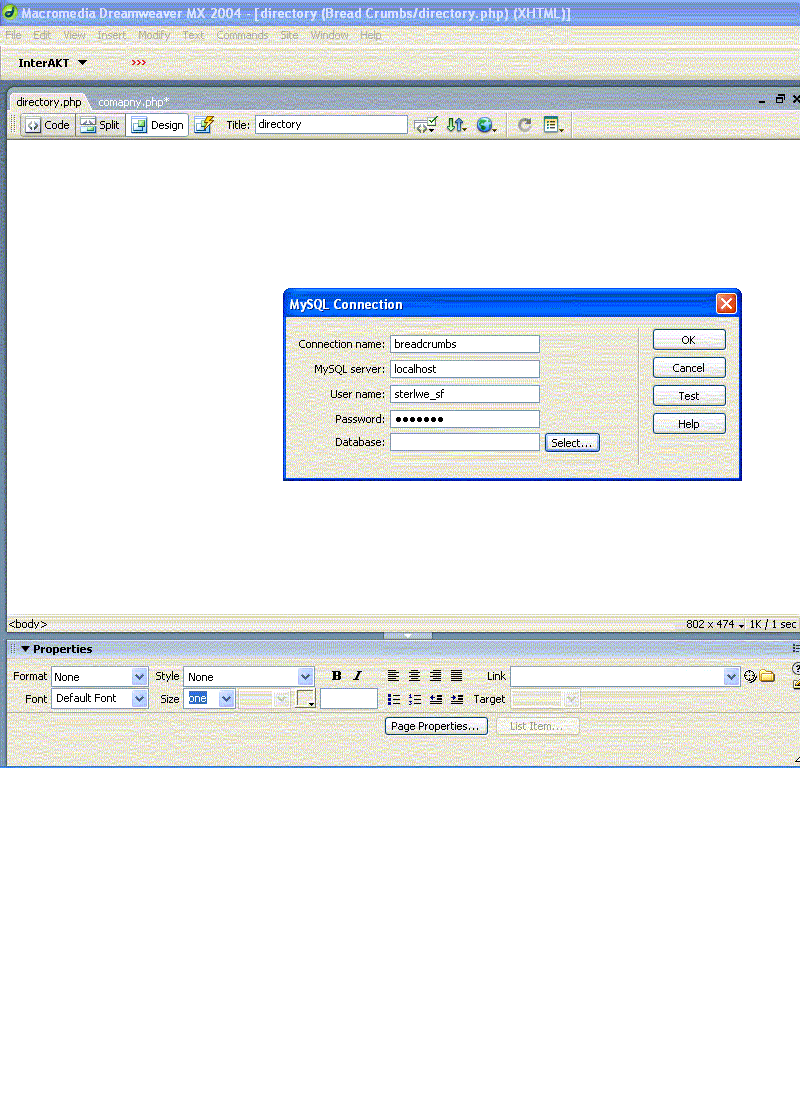
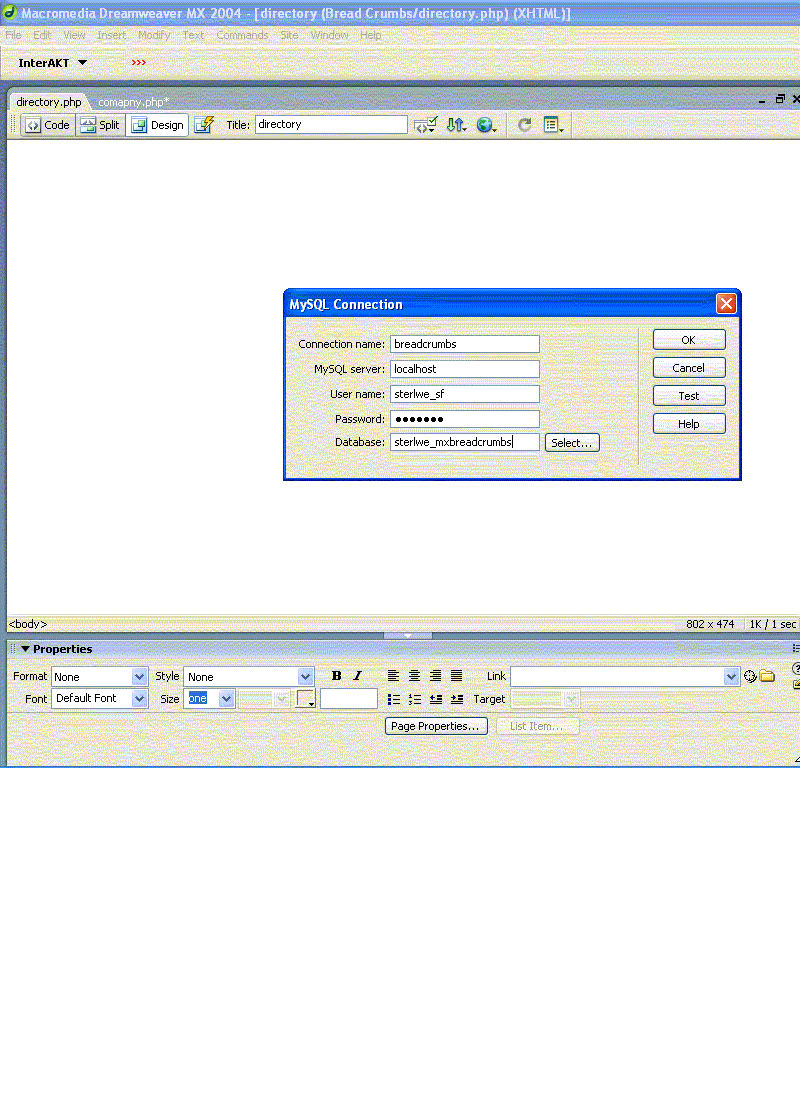
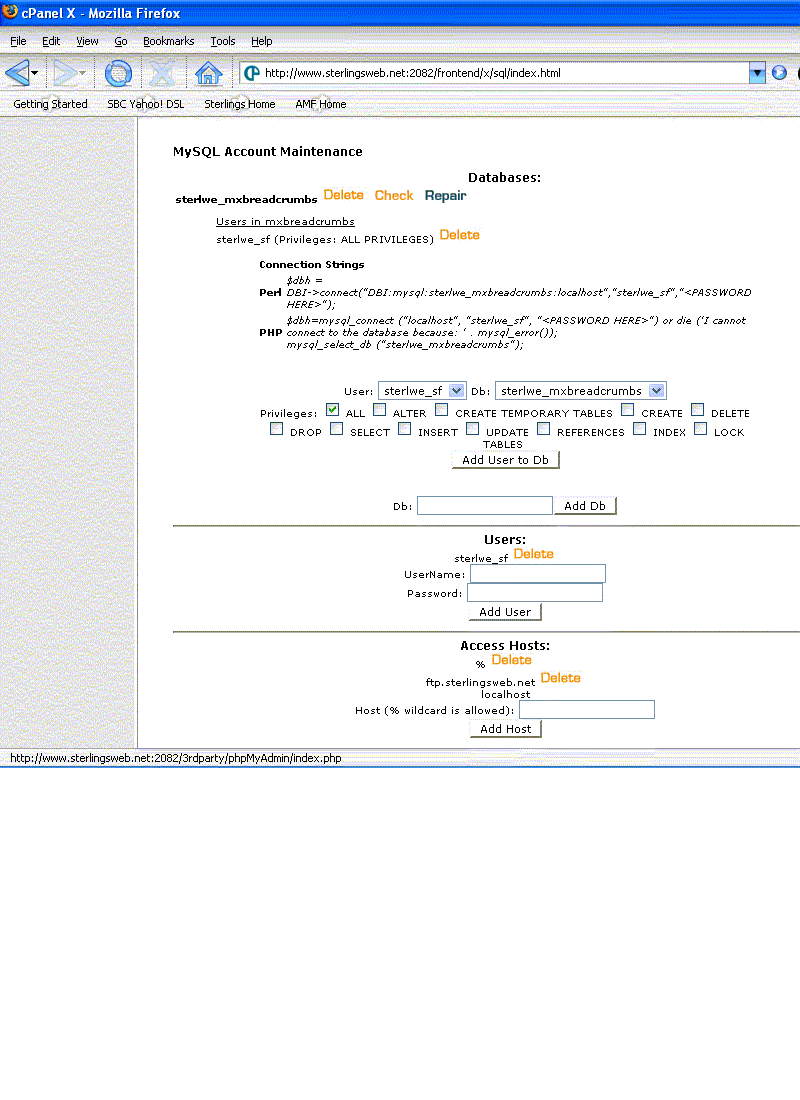
Ok I will try posting these 3 pics in an effort to show what i am looking at and see if any one can see where i am going wrong. Please take a look and let me know if you see my mistake. thanks Steve PS Very sorry did not mean to start a new tread. I was in feeling defeated and clicked new topic guess i messed up.... Thanks Steve Attached thumbnail(s) Edit by TCH-David: Post merged from separate topic.

-
Nortk. Hey thanks for the reply and effort. I have set up another account in my resellers account and am now trying to do the same thing, only difference is the domain name. I have looked w/ cute ftp program and file manager in cpanel. The only thing I have is the _mmServerScript folder and the mx_breadcrumbs folder. In the breadcrumbs folder I have the company.php and the directory .php file that the tutorial has you create one step before connecting to the database.In the _mm folder I have the MMHTTPDB.php mysql.php file.In all the attempts I have gotten the connections before its just that I have done so may thing that I now do not remember what it said.. Once again I have done everything and am really wondering what's going on. The truth is its not that hard or it should not be. I have done much reading now on the subject and I can not hook up no matter what I do. I do thank you though for helping and groovery fish as well and I also thank you for not thinking I have insulted you and trying to help instead of criticizing me .... once again thanks Steve
-
Thanks Bruce sorry about not getting back on till this morning my time, thank you for asking and yes that is my cpanel name and the user is correct also. Its a new day and my regular job has me doing things, but i tell you i sure wish i could see what i am doing wrong.. Six replies ago on this same page I stated all that I am doing and what my setting are, they seem to be right but at this point just do not know. Thanks again Steve
-
I understand u running out of questions i know i have yes i got that stright form dreamweaver under the results tab. I guess that whats it means when it says dreamweaver lets you look ast the log. well I turned in a ticket on the 500 error. glad that site is not up yet. once again thanks Steve
-
Are you sure you don't have a firewall? What are you using for security at home? yes real sure about that. what i do have is set up to let things thru. as far as i want to go on that one. Have you tried that troubleshooting article? Looked at the Dreamweaver MX FTP Log? Sounds that the log could help diagnosing the problem. Yes i did good reading. I did not know that about Dreamweaver. I looked at the ftp log and it had no complaints. That is to say that i connected to everything it wanted to. no error's not had to stops etc you can see below i posted the last couple of connects this even makes reference to the -mm s folder and i can not see where threr was a prob.. ? take a look < 220---------- Welcome to Pure-FTPd [TLS] ---------- < 220-You are user number 1 of 50 allowed. < 220-Local time is now 16:06. Server port: 21. < 220 You will be disconnected after 15 minutes of inactivity. > USER amf < 331 User amf OK. Password required > PASS < 230-User amf has group access to: amf < 230 OK. Current restricted directory is / > PWD < 257 "/" is your current location > PWD < 257 "/" is your current location > CWD / < 250 OK. Current directory is / > MKD MM_CASETEST4291 < 257 "MM_CASETEST4291" : The directory was successfully created > CWD / < 250 OK. Current directory is / > RMD MM_CASETEST4291 < 250 The directory was successfully removed > CWD / < 250 OK. Current directory is / > MKD xyiznwsk < 257 "xyiznwsk" : The directory was successfully created > CWD / < 250 OK. Current directory is / > PORT 68,92,125,12,11,64 < 200 PORT command successful > TYPE A < 200 TYPE is now ASCII > LIST < 150 Connecting to port 2880 < drwx--x--x 16 32373 amf 4096 Oct 12 16:06 . < drwx--x--x 16 32373 amf 4096 Oct 12 16:06 .. < -rw------- 1 32373 amf 957 Jun 22 14:21 .accesshash < -rw------- 1 32373 amf 15 Oct 12 15:00 .contactemail < -rw-r--r-- 1 32373 amf 349 Oct 12 10:56 .htaccess < drwxr-xr-x 2 32373 amf 4096 Jun 22 14:51 .htpasswds < -rw------- 1 32373 amf 12 Oct 12 15:00 .lastlogin < drwx------ 2 32373 amf 4096 Jun 16 13:35 .neomail < -rw------- 1 32373 amf 24 Jun 20 21:15 .spamkey < drwx------ 2 32373 amf 4096 Oct 7 13:14 .sqmaildata < drwx------ 2 32373 amf 4096 Jun 18 13:30 .trash < -rw-r--r-- 1 32373 amf 1 Jun 16 16:24 .whmtheme < drwxr-xr-x 2 32373 amf 4096 Oct 12 15:07 Connections < drwxr-xr-x 2 32373 amf 4096 Oct 12 12:56 _mmServerScripts < -rw-r--r-- 1 32373 amf 313 Oct 12 12:56 company.php < drwxr-xr-x 4 32373 amf 4096 Jun 16 14:21 cpanel3-skel < drwxr-xr-x 6 32373 amf 4096 Jun 16 16:25 cpanelbranding < -rw-r--r-- 1 32373 amf 313 Oct 12 12:56 directory.php < drwxr-xr-x 4 32373 amf 4096 Sep 13 10:04 etc < drwxr-x--- 3 32373 12 4096 Oct 12 16:04 mail < drwxr-xr-x 3 32373 amf 4096 Jun 15 22:01 public_ftp < drwxr-x--- 8 32373 99 4096 Oct 12 13:35 public_html < drwx------ 6 32373 amf 4096 Jun 15 22:05 tmp < lrwxrwxrwx 1 0 0 11 Jun 15 22:01 www -> public_html < drwxr-xr-x 2 32373 amf 4096 Oct 12 16:06 xyiznwsk < 226-Options: -a -l < 226 25 matches total > CWD /www < 250 OK. Current directory is /www > CWD / < 250 OK. Current directory is / > RMD xyiznwsk < 250 The directory was successfully removed > CWD /_mmServerScripts < 250 OK. Current directory is /_mmServerScripts > CWD /_mmServerScripts < 250 OK. Current directory is /_mmServerScripts > PWD < 257 "/_mmServerScripts" is your current location > CWD /_mmServerScripts < 250 OK. Current directory is /_mmServerScripts > PORT 68,92,125,12,11,65 < 200 PORT command successful > TYPE A < 200 TYPE is now ASCII > LIST < 150 Connecting to port 2881 < drwxr-xr-x 2 32373 amf 4096 Oct 12 12:56 . < drwx--x--x 15 32373 amf 4096 Oct 12 16:06 .. < -rw-r--r-- 1 32373 amf 2062 Oct 12 12:56 MMHTTPDB.php < -rw-r--r-- 1 32373 amf 10265 Oct 12 12:56 mysql.php < 226-Options: -a -l < 226 4 matches total > CWD / < 250 OK. Current directory is / > PWD < 257 "/" is your current location > CWD /_mmServerScripts < 250 OK. Current directory is /_mmServerScripts > CWD /_mmServerScripts < 250 OK. Current directory is /_mmServerScripts > PWD < 257 "/_mmServerScripts" is your current location > CWD / < 250 OK. Current directory is / > PWD < 257 "/" is your current location > CWD /_mmServerScripts < 250 OK. Current directory is /_mmServerScripts > CWD /_mmServerScripts < 250 OK. Current directory is /_mmServerScripts > PWD < 257 "/_mmServerScripts" is your current location > CWD / < 250 OK. Current directory is / > PWD < 257 "/" is your current location > CWD /_mmServerScripts < 250 OK. Current directory is /_mmServerScripts > CWD /_mmServerScripts < 250 OK. Current directory is /_mmServerScripts > PWD < 257 "/_mmServerScripts" is your current location > CWD / < 250 OK. Current directory is / > PWD < 257 "/" is your current location > CWD /_mmServerScripts < 250 OK. Current directory is /_mmServerScripts > CWD /_mmServerScripts < 250 OK. Current directory is /_mmServerScripts > PWD < 257 "/_mmServerScripts" is your current location > CWD / < 250 OK. Current directory is / > PWD < 257 "/" is your current location > CWD /_mmServerScripts < 250 OK. Current directory is /_mmServerScripts > CWD /_mmServerScripts < 250 OK. Current directory is /_mmServerScripts > PWD < 257 "/_mmServerScripts" is your current location > CWD / < 250 OK. Current directory is / > PWD < 257 "/" is your current location
-
no thats just testing only I guess i will turn in a ticket for the 500 error thing i hope i did not blow it up messing with this for 2 days stright..
-
I just started getting that 500 error about 15 mins ago?? not sure whats up. I changed the setting in mysql connection box under mysql server and changed it to http://ftp.amfmechanical.com. maybe just bad timing buit soon as i tried that (connecting it went to that error.. I dunt know getting ready to post last question you ask even if you can not get this either i thank you much for trying.. Steve 4) Have you downloaded the file(s) that Dreamweaver puts on the server to and opened it locally to see if Dreamweaver has uploaded the correct info? If Dreamweaver uploaded the file with the connection info and when you changed the info Dreamweaver wasn't able to over-write the file then you would never get it to work. breadcrumbs_conn.php thias is in the connections folder and the other two below are in the mmserver folder: <?php # FileName="Connection_php_mysql.htm" # Type="MYSQL" # HTTP="true" $hostname_breadcrumbs_conn = "localhost"; $database_breadcrumbs_conn = "amf_mxbreadcrumbs"; $username_breadcrumbs_conn = "amf_shf"; $password_breadcrumbs_conn = "33663366"; $breadcrumbs_conn = mysql_pconnect($hostname_breadcrumbs_conn, $username_breadcrumbs_conn, $password_breadcrumbs_conn) or trigger_error(mysql_error(),E_USER_ERROR); ?> the other two do not seem to make refenence to any settings pictular to my site kinda a generic php. files which are..MMHTTPDB.php mysql.php
-
I do not think there are any stupid questions my friend, let me try to anwser your wuestions. 1) Do you have a firewall that could be causing a problem? No there shoud not be. I have cable at home and dsl at the office and no firewalls I am aware of. 2) It sounds as if you are not getting an error message or anything, so does Dreamweaver think it IS connected? What are you expecting to see that you are not? (remember I don't have Dreamweaver, so I don't know) My bad. I do get error message, the same one every time. 404 can not find this server. Tnot quoting but it goes something like does not map http://ftp.amfmechanical.com _mmserverscript MMHTTPDB.php. 3) Have you checked the permissions on that file(s) to make sure that Dreamweaver can read the info? no not sure how to. but remember i did do it for a night so i was thinking default would be right. However i should check that. 4) Have you downloaded the file(s) that Dreamweaver puts on the server to and opened it locally to see if Dreamweaver has uploaded the correct info? If Dreamweaver uploaded the file with the connection info and when you changed the info Dreamweaver wasn't able to over-write the file then you would never get it to work. going to try and anwser this after looking at the file thanks Steve
-
Hey Rob no prob, i know it takes time. I also know everyone is a volunteer. I did not think that i was talking in a way that said other wise. Nothing but compliments from me as my words say. Nortk: how right you are as i actually did work a tutitouirl for a short time at my home computer using localhost. My prob is the same one though. I can not hook up any more. I only was able to do it once. Here is all that I have done. Set up a database and called it mxbreadcrumbs. created a user and called it sf gave a password to the sf (user) assigned the user to the database.I also in cpanel under hosts inserted the % sign. Here is how I fill out the dreamweaver mx 2004 sql connection box. Connection name: breadcrumbs mysql server: localhost.. user name amf_sf (amf is cpanel name) password: xxxx database amf_mxbreadcrumbs, sometimes i try select. i have also tried amfmechanical.com in the server name. host, the ip number in the cpanel at top of page. I have created new databases and done the same things. I have looked in the server using an ftp program, and have seen the connections folder with mxbreadcrumbs.php in it. I have also seen the _mmServerScripts folder with the MMHTTPDB.php and mysql.php in the root of the site. I have tried putting in and taking out public_html in the url prefix in the testing server box of dreamweaver. Actually my testing server is as follows:Server model: Mysql PHP ACCESS: FTP FTP host : amfmechanical.com Host directory: is blank (although i have tried putting in public_html with no better result Login amf_sf (cpanel name)Password xxxx the passive box is checked (i have done that both ways as well same result.) URL prefix: http://ftp.amfmechanical.com/ When i click test it always comes back as a good connection. so it would seem that no matter what I do i can not get it to go. I don't think I left any thing out. I have read many articles so far but still nothing. Sooo If any one knows what I am doing wrong i sure would be greatful.. Thanks Steve
-
I thank you groovery fish for the kinds words. I will read up on it all today with a fresh start. Very sorry to have affected you TCH Dick for you to assume I am one who only has a crapy attitude means to me that my words offended you and for that I really am sorry. Like Groovey said he understands how frustrating it can be, and I was trying to be careful not to offend anyone knowing that I was not in the best of places. In any case it is you that i find the most confusing as your post says no to local host and the others are saying yes. So I just wanted some info and I have been able to get help here before and will keep doing so as i like this hosting company very much. Everything I have read says that its going to be a dreamweaver prob. I have a post in the forums over there and am waiting for an answer. Thank you all for your help and once again Dick so sorry for causing you to believe things you could not possibly know.. Steve