finishdish
-
Posts
20 -
Joined
-
Last visited
finishdish's Achievements


-
Tls / Ssl Email Encryption Process
finishdish replied to finishdish's topic in CPanel and Site Maintenance
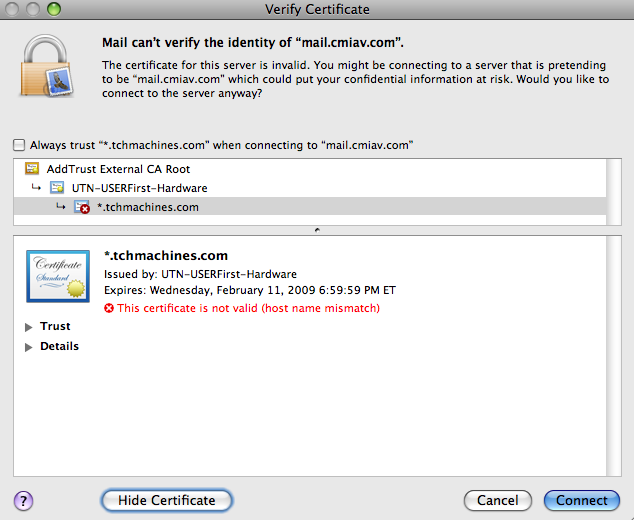
I turned on SSL in Apple Mail (no option for TSL), and received a warning in regards to the certificate. Attached is a screenshot of the error. It seems we need a certificate for mail.cmiav.com?
-
Greetings, A client of ours has requested that we enable email encryption via TLS. TLS is described in details here... http://searchsecurity.techtarget.com/tip/0...1111138,00.html From what I've gathered, TLS is a sibling of SSL, and requires the utilization of a Digital Certificate. Configuration of our email gateway to interface with the certificate will also be required. Is anyone familiar with this technology and the process of implementation? Can TCH's shared certificate be utilized (not a requirement just a question)? Is client configuration required? Any advice would be greatly appreciated. Thanks much. Best, Joe
-
Hello, I'm having an issue with my IMAP account in that I'm unable to decrease the size of my mailbox. In every other way the account is functioning properly. When I delete a message, it is placed into my Trash mailbox. When I delete those files in the Trash mailbox, the files are removed (from my email client). No matter what though, the account size (as listed in the cPanel) does not decrease. I've double checked that the preference to "Store deleted messages on the server." is unchecked, and have looked through all of the IMAP folders via webmail. Does anyone know where those deleted messages are being stored? Any help would be greatly appreciated. Best, Joe
-
Hello, First let me apologize if this is not the ideal forum for my question. I looked through the hierarchy, and this forum was the closest I could determine. Background: I'm using Apple's Maill.app to check email via IMAP. No real problems since setup nearly 3 years ago. Issue: My issue is that I am unable to reduce the size of my ever-growing Inbox. I understand that IMAP stores all data on the server. However, when I use the command "Remove Attachments" in Mail.app, the attachments are removed from my client, but the size of my Inbox as listed in the cPanel does not change. Help appreciated. Thanks much, finishdish
-
Multiple Domains - Single Web Site
finishdish replied to finishdish's topic in CPanel and Site Maintenance
Andy, Thank you for your quick response. I've changed the DNS server listing, and submitted a ticket to park the new domains. Much appreciated. Joe -
Hello, I am looking for information on the process by which to update our listing on TCH's nameservers as we have recently purchased additional domain names that we would like to point to our primary account with TCH. Any help would be greatly appreciated. Current Domain Hosted by TCH cmiav.com New Domains to be directed to TCH account makeeveryseatcount.biz makeeveryseatcount.info makeeveryseatcount.net makeeveryseatcount.org makeeveryseatcount.us Best Regards, Joe
-
In Squirrel Mail I unsubscribed to all mailboxes before entering "INBOX" as the IMAP Path. All sub folders are shown by default. No biggie. I've deleted as many of the sub-folders as I could (that were empty), and did NOT delete "INBOX_Trash" per TCH request. Cannot delete the following folders... 1. cppop - cache - msgs 2. mailboxlist 3. Trash All I want is... 1. Drafts 2. Sent Messages 3. INBOX_Trash Eh. No biggie. Thanks for your help earlier though. Feeling much better now. Regards, Joe
-
Lovely. That did the trick. Thanks so much for your help. If it's not too much to ask, do you know if any of these mailboxes can be deleted? For instance right now I see "Trash", "Deleted Messages", "INBOX_Trash", and yet another "Trash". A bit confusing. Any advice or direction would be greatly appreciated. Best Regards
-
The support team was quickly able to provide me with a workaround for accessing Squirrel Mail. Thanks guys! Following that, I did "subscribe" to a few of my sub-folders, deleted the Mail account on my iPhone, then added it back in. Still only seeing my "Inbox" and "Trash". Is this article relevent? It seems to address my issue exactly. http://docs.info.apple.com/article.html?artnum=305717 Thanks in advance!
-
Hello, I'm working on the same issue with my iPhone. Currently my IMAP account only shows the "Inbox" for each account. Tried logging into squirrel mail, but I get a blank white screen that says "No Input file specified." Any advice? Thanks in advance. Joe
-
Hello TCH Family Members. I have a password protected directory that I'd like users to get to via https in order to secure their login information. Is that possible in conjunction with a sub domain re-direct? I currently have the subdomain redirect set to example: https://serverxx.totalchoicehosting.com/me/protected_dir/ The subdomain is re-directing to the proper dir, but is asking for the directory login before kicking in the ssl (password sent in the clear). Once you enter the directory login info, the directory asks for the login again, this time apparently with ssl enabled (password encrypted). Any thoughts on why it's asking for the login twice, or how I might be able to accomplish this in another way? Thanks (really), Joe
-
Subdomain Is Password Protected For No Reason
finishdish replied to finishdish's topic in CPanel and Site Maintenance
Thanks Rob, It's odd. That first page just won't load without the password for the directory it refreshes to. Two logins for one password protected directory. finishdish -
Hello TCH Family, I've got a cpanel subdomain pointing to a meta re-direct file that points to a password protected directory. Like this: subdomain re-direct (https) > non-password protected directory with a meta re-direct file in it > password protected directory Since the subdomain redirects using the https protocol (via the TCH ssh key url), once the user is re-directed to the password protected directory, their username and password should be submitted securely. However, for whatever reason, the server is asking for a username/password (not securely) before it will load the meta re-direct page (using ssh). Any thoughts on this? Password protection is not enabled for the re-direct directory, so I'm not sure why it's asking for a login. If I enter the username/password for the password protected directory which the re-direct file points to, it then loads the re-direct file (sending my password in the clear). Then the re-direct file sends me to the password protected directory, which asks for a username and password (securly now), and allows access to the password protected directory. It works, but I'm being asked for a directory login twice. Once without ssh and once with ssh. Odd. Any help would be appreciated. Thanks, finishdish
-
Current situation: 1. Creat the sub-domain "nnn.website.com" 2. Setup Redirection to "http://www.website.com/test" cPanel displays the following confirmation: "http://nnn.website.com is currently being redirected to http://www.website.com/test" However, now if I go to http://nnn.website.com, the url loads, but I get a green "cPanel" page that says "There is no website configured at this address." History: Forwarding used to go to a password protected directory. This worked just dandy. But to eliminate directory passwords being sent in the clear I: 1. Created a meta-tag redirect file that both turned on https and also directed the user to the password protected directory 2. Then pointed the sub-domain re-direct to the meta-tag redirect file I just created. The problems began as soon as I changed the forwarding address. The first time I changed the sub domain forwarding address, it kept asking for a directory password (just like before). I know I know...DNS propigation. The wierd thing is though, even if I delete the subdomain, then re-create it, then try to setup forwarding again, it still displays the prior forwarding address (of the subdomain I deleted earlier). It seems cPanel is having trouble forgetting the previous settings. Odd happenings. Now it's to the point where if I go to "nnn.website.com" it will sometimes ask for a password (for a directory that shouldn't be password protected), then go to the meta tag https forward file, which sends you to the password protected directory. Yeah! But if I quit the browser and try again, it goes to the "There is no website configured at this address." page. Whoa. Sorry for the long message. Just trying to be as clear as possible. Thanks for reading and thanks for any help. Regards, finishdish
-
Backup Filenaming Convention
finishdish replied to finishdish's topic in CPanel and Site Maintenance
I think you're right. Thanks for helping to clarify.