jrsweets
-
Posts
34 -
Joined
-
Last visited
Everything posted by jrsweets
-
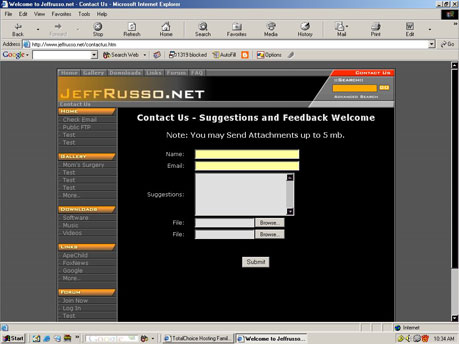
That did it. I have a google toolbar installed on all the computers that I tried it on except the win98 machine. When I remove the toolbar the yellow goes away. The google toolbar has an autofill form built in. I would like to thank everyone for the time and effort that they put into helping me out. THANKS. Rock Sign
-
Thank you everyone for the help. I have noticed that other sites that have forms do the same thing. I am using IE6 on Win2000, and WinXP. The forms on other sites first appear one color and then change to the yellow that is in my attachment. Maybe OS, or a setting in IE. I tried it in Mozilla and the yellow is not there. Very strange. I was able to check on a Windows 98 machine with IE6 and all the updates. The yellow does not appear. It must have something to do with either Windows2000, XP, or some setting in IE.
-
I've tried on three different computers. What version of IE are you running? When the page first loads it loads with gray color, then when finished it changes to the yellow.

-
I have this page on my site. http://www.jeffrusso.net/contactus.htm However, it seems in internet explorer whenever I name a form input field "Name", "Email" or "Email Address" the color of the input field background turns yellow. I can't figure it out. I have tried everything. When the page is viewed in Mozilla the color looks fine, however I get the yellow color in IE. Any thoughts? My css style sheet is located at http://www.jeffrusso.net/style.css Thanks in advance.
-
I've tried using that script as is (I added my domain to the one line). The problem I had is that a box always came up where it asks you to enter a network password. "username + domain.com" is already filled in. If you try using the demo from the link you gave me, you will see the same problem I had.
-
Thanks, I took a look at hotmail. I added the lines in bold, however it does fill in the domain for me. I am new to java script and I am trying to learn it. If anyone knows what I am doing wrong, any help would be greatly appreciated. Thanks, Jeff <html> <head> <title>Untitled Document</title> <meta http-equiv="Content-Type" content="text/html; charset=iso-8859-1"> <script language="JavaScript" type="text/javascript"> <!-- function squirrelmail_loginpage_onload() { document.forms[0].js_autodetect_results.value = '1'; var sLogin=document.forms[0].login_username.value; if (sLogin.indexOf('@') == -1) {document.forms[0].login_username.value = document.forms[0].login_username.value + "@jeffrusso.net";} } // --> </script> </head> <body> <form method="post" action="http://www.jeffrusso.net/sqmail/src/redirect.php"> <input type="hidden" name="js_autodetect_results" value="0"> User : <input type="text" name="login_username" size="30"><br><br> Password: <input type="password" name="secretkey" size="30"> <input type="submit" value="Login"> </form> </body> </html>
-
Is there a way to edit this script so that you do not need the enter your domain name with your username to login to squirrel mail? I want the user to be able to enter "username" not "username@domain.com" in the user field. Is there a way to have that filled in automatically. Any thought would be appreciated. Thanks Jeff <head> <script language="JavaScript" type="text/javascript"> <!-- function squirrelmail_loginpage_onload() { document.forms[0].js_autodetect_results.value = '1'; } // --> </script> </head> <form method="post" action="http://your.host.com/sqmail/src/redirect.php"> <input type="hidden" name="js_autodetect_results" value="0"> User: <input type="text" name="login_username" size="10"> Password: <input type="password" name="secretkey" size="10"> <input type="submit" value="Login"> </form>
-
How would I find /etc/httpd/conf/httpd.conf on my site. When I go into the etc directory there is a couple of files however not what I am looking for, from what I understand this is the apache config file, and apache is installed on sites hosted here. Any help would be appreciated.